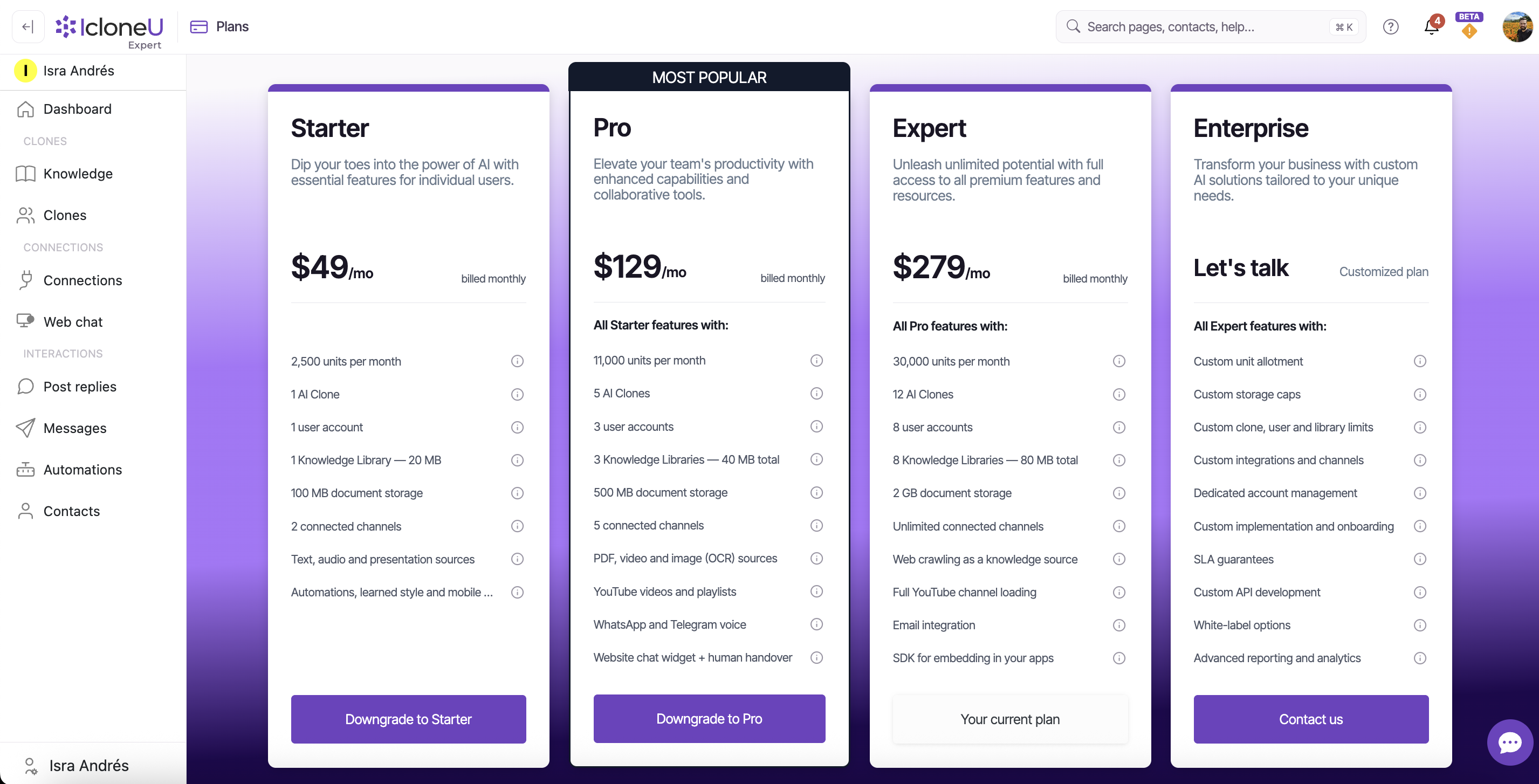
IcloneU comes in four tiers — Starter, Pro, Expert and Enterprise. Each step up raises the same handful of levers: how many units you get a month, how many AI Clones you can run, which channels and knowledge source types are available, how many seats and knowledge libraries you have. This guide lays all of that out so you can find the smallest plan that still fits.
The full, always-current matrix lives on the Plans page in the app (open the avatar menu → Plan, or use Upgrade plan from Account settings → Your details). Prices and limits there are the source of truth; this guide mirrors them but the app wins if anything ever differs.
The four plans at a glance
Each plan builds on the one before it — Pro is "all Starter features, plus more", Expert is "all Pro features, plus more", and Enterprise is "all Expert features" with everything sized to you. Here's the shape of each tier and who it's aimed at:
- Starter — $69/mo ($690 billed annually). "Dip your toes into the power of AI with essential features for individual users." One Clone, one seat, two channels — built for a solo creator getting started.
- Pro — $199/mo ($1,990 annually), marked Most popular. "All Starter features" plus more units, four Clones, two seats, five channels, richer source types, web crawling and a website chat widget — for a growing team.
- Expert — $449/mo ($4,490 annually). "All Pro features" plus far more units, seven Clones, four seats, eight channels, email and an SDK — for heavier, multi-channel operations.
- Enterprise — Let's talk (a customized plan). "All Expert features" with limits, integrations, support and contractual terms negotiated to your organization. You reach it with Contact us rather than a self-serve checkout.
A Monthly / Yearly toggle at the top of the Plans page switches every price between the two billing periods. Yearly is billed once for the whole year (for example, Expert is $449/mo or $4,490 billed annually) and carries a savings badge — paying yearly works out cheaper than twelve monthly charges.
Tier-by-tier comparison
These rows line up with what the Plans page shows for Starter, Pro and Expert; the guide groups a couple of extra details (like document-storage caps and specific source types) that the app rolls into broader rows. Enterprise isn't a fixed column — its numbers are custom — so it's covered separately below. Read the source-type and channel rows as cumulative: each tier includes everything in the tier to its left.
| Feature | Starter | Pro | Expert |
|---|---|---|---|
| Units included | 10,000 / month | 35,000 / month | 120,000 / month |
| Knowledge storage | 20 MB | 40 MB total | 80 MB total |
| Number of Clones | 1 | 4 | 7 |
| Seats | 1 | 2 | 4 |
| Knowledge libraries | 1 | 4 | 7 |
| Document storage | 100 MB | 500 MB | 2 GB |
| Connections | 2 channels | 5 channels | 8 channels |
| Web chat widget | — | Yes | Yes |
The Document storage caps (100 MB / 500 MB / 2 GB) are accurate, but the live Plans table folds them under the broader storage story — only Knowledge storage appears as its own row there. We break document storage out here as an extra detail.
Knowledge source types by tier
What you can teach a Clone from grows with the plan. Each tier keeps everything below it and adds new source types on top:
| Knowledge source | Starter | Pro | Expert |
|---|---|---|---|
| Text formats | Yes | Yes | Yes |
| Audio | Yes | Yes | Yes |
| Presentations | Yes | Yes | Yes |
| — | Yes | Yes | |
| Video | — | Yes | Yes |
| Images with text (OCR) | — | Yes | Yes |
| YouTube videos and playlists | — | Yes | Yes |
| Full YouTube channel loading | — | — | Yes |
| Web crawling | — | Yes | Yes |
For the file types that fall under each of these, see Supported file formats and Adding documents and files. Web crawling is covered in Adding website URLs.
We break a couple of these out for clarity that the live Plans table doesn't render as their own rows. PDF support ships with Pro and up, but the app doesn't list it as a separate source row. And the Plans table shows a single YouTube source row rather than splitting YouTube videos and playlists from Full YouTube channel loading — loading an entire channel is still an Expert-only capability, it just isn't its own row there.
Channels by tier
Each plan includes a number of connected channels — 2 on Starter, 5 on Pro, 8 on Expert — and sets which channel types are available. The connectable channels are the same core set across tiers, with voice messaging added on the higher plans:
| Channel | Starter | Pro | Expert |
|---|---|---|---|
| Yes | Yes | Yes | |
| Yes | Yes | Yes | |
| YouTube | Yes | Yes | Yes |
| WhatsApp (text only) | Yes | Yes | Yes |
| WhatsApp (voice messages) | — | Yes | Yes |
| Telegram | Yes | Yes | Yes |
| Telegram (voice messages) | — | Yes | Yes |
| Web chat widget | — | Yes | Yes |
| Mercado Libre (coming soon) | — | — | — |
Mercado Libre appears on the Plans page marked coming soon, but that label is out of date: since September 5, 2026 every account can connect it from Connections → New connection (Mercado Libre México sellers only). Shopify is no longer listed in this table: as a connector it is available today on every paid plan (see Connecting your Shopify store) — a Shopify messaging channel is not part of the published plan matrix. And Email is an Expert capability that the Plans page lists as a card feature ("Email integration") rather than a row in this channels table — so it isn't shown above, but it is available on Expert. To connect the channels that are live today, start with Connecting your first social account.
Included with every plan
Everything above is about amounts — how much of each thing a tier includes. A different question is which parts of the product you get at all. For the three modules below the answer is the same on all four plans: Starter gets them exactly as Enterprise does, with no tier gate in between. That doesn't hold for the whole product — channels, knowledge source types and the web-chat widget really do differ by tier, which is what the tables above and the next section are for — but these three modules don't.
- Contacts — the contact records your Clones build up, across four tabs: Contacts, Tags, Fields and Broadcasts. See Managing contacts.
- Reviews — collecting and working customer reviews, with tabs for the reviews themselves, the items being reviewed, review requests, Q&A, staff mentions, testimonials and settings.
- Automations — the whole module, all eight tabs: Workflows, Gallery, Capture, Sequences, Connectors, API Keys, Webhooks and Code Pools. Five of them are switched on by your plan, and all four plans switch on all five; Workflows, Gallery and Capture are never checked against a plan at all. What are automations maps what each tab is for.
You won't find a "Contacts", "Reviews" or "Automations" row in the comparison tables above, and that's not an omission — there'd be nothing to compare. Every one of those is on Starter, Pro, Expert and Enterprise alike. The rows worth comparing are the ones that actually differ: units, Clones, seats, libraries, storage, channels and knowledge source types.
The Connectors tab connects IcloneU to services you already run — a Shopify store, a Google Sheet, a CRM — so your Clone can look things up and your workflows can react to what happens there. That's separate from a channel, which is a place customers message you (WhatsApp, Instagram, Telegram and the rest). Connectors have a ceiling — 2 on Starter, 5 on Pro, unlimited on Expert and Enterprise — and it is counted separately from your messaging channels (whose Connections row above reads 2 / 5 / 8). A Shopify store doesn't count toward the channel Connections your plan includes, and a WhatsApp number doesn't count toward the connector ceiling. So on Starter you can hold two connector connections alongside your channels; an account already at the connector limit is refused a new connector connection until you remove one or move up a tier.
What only Expert adds
On top of everything in Pro, the Expert plan unlocks a handful of capabilities aimed at heavier and more technical use:
- Eight connected channels — more than any other self-serve tier includes.
- Full YouTube channel loading — load every video from a channel, not just a single playlist.
- Email integration — connect a dedicated email address so a Clone can triage and reply to inbound email.
- SDK for embedding in your apps — embed a Clone inside your own web or mobile app, with usage billed against your plan.
The Enterprise plan
Enterprise isn't a fixed-price tier — it shows Let's talk on the Plans page and is reached with a Contact us button instead of a checkout. It's described as a customized plan: "all Expert features" with the limits and terms sized to your organization. The Plans page lists the kinds of things an Enterprise conversation covers:
- Custom unit allotment and custom storage caps.
- Custom Clone, user-seat and knowledge-library limits.
- Custom integrations and channels.
- Dedicated account management, plus custom implementation and onboarding.
- SLA guarantees, custom API development, white-label options, and advanced reporting and analytics.
These are the topics an Enterprise agreement is built around — the exact numbers, integrations and any service-level commitments are negotiated per contract, not published as fixed figures. Treat the list as the scope of the conversation, and confirm specifics with the IcloneU team via Contact us.
An Enterprise account is governed by a Master Services Agreement instead of the self-service Terms of Use, and it is accepted inside IcloneU: before the account's owner can keep working, a Welcome to IcloneU screen shows the agreement, to be read to the end and accepted. The screen notes that the Service Order (Annex A), with the plan and fees, is signed separately. People you invite to your team aren't asked to accept it.
Add-on modules
Your plan sets the baseline; add-on modules extend it without moving you up a tier. They're managed from Account settings → Billing, under Add-on modules, and each one is a separate monthly subscription on top of your plan.
| Module | Price | What it adds |
|---|---|---|
| Commerce | $649 / mo | "AI sales concierge for your store: catalog, checkout links, order lookup and recovery. Upgrades your whole account to our most capable AI." Also brings 150,000 extra units a month and unlimited stores, and it can be added on any plan. |
| Marketing | $79 / mo | "Segments, broadcasts, sequences and lead capture. Channel messaging is billed by contracted volume." |
| Intelligence | $59 / mo | "Insights, sentiment, trends and ask-your-data on top of your conversations. Uses your plan units." |
| Reputation | $59 / mo | "Review requests, moderation, widgets and Google reviews. Unlimited review requests (fair use)." |
The Billing page states it directly: "Adding a module bills the prorated amount now; removing one keeps it active until the end of your current period." So you are never charged twice for the same month, and cancelling doesn't cut you off mid-period — you keep the module until the period you already paid for runs out.
While you're on a trial the modules are listed but can't be added: "Add-on modules become available once your trial converts to a paid plan." Trials run on Starter and Pro only, so if you're evaluating a module, plan to convert first.
Two of them change how much you can do rather than only what you can do. Commerce adds its 150,000 units on top of your plan's monthly allowance, so it lifts capacity as well as capability. Intelligence does the opposite — it spends your existing plan units, so heavy use of insights draws down the same balance your Clone's replies use. See Understanding usage and limits.
Choosing and switching
A quick way to land on the right tier: start from the lever that bites first.
- Volume of replies — if you keep running out of units, that's the strongest signal to move up (Starter 10,000 → Pro 35,000 → Expert 120,000 a month). See Understanding usage and limits for how units are counted.
- How many Clones and seats — one Clone and one seat on Starter; four Clones and two seats on Pro; seven Clones and four seats on Expert.
- Which channels and sources — need WhatsApp/Telegram voice, a website chat widget, PDFs, video or web crawling? That's Pro or higher. Need full YouTube channels, email or the SDK? That's Expert.
- Custom everything — if the fixed tiers don't fit (very high volume, bespoke integrations, contractual SLAs), that's the Enterprise conversation.
When you've picked a tier, Upgrading or downgrading your plan walks through the switch, and Managing payment methods covers the card the new plan is billed to.
Frequently asked
Four: Starter, Pro, Expert and Enterprise. Starter, Pro and Expert have fixed prices and limits; Enterprise is a customized plan reached via Contact us.
The Monthly / Yearly toggle on the Plans page switches every price between a per-month charge and a single annual charge. Yearly is billed once for the year (e.g. Expert is $449/mo or $4,490 billed annually) and carries a savings badge, so it works out cheaper than twelve monthly payments.
Yes, if you sell on Mercado Libre México. The Plans page still marks it coming soon, but since September 5, 2026 every account can connect it from Connections → New connection. A seller on another Mercado Libre marketplace is turned away when connecting, and nothing is saved.
Yes, and it doesn't depend on your tier. Shopify is available as a connector — go to Automations ▸ Connectors, pick Shopify and connect your store — and the Connectors tab is included with every paid plan. Connecting your Shopify store walks the setup. What doesn't exist is Shopify as a messaging channel, meaning a place customers write to you — and the Plans page no longer lists one. The connector is a different thing and it works today.
Email integration is an Expert feature. It's listed on the Expert plan card rather than in the channels comparison table, so it doesn't appear as a row there — but it is available once you're on Expert.
Your current tier shows in Account settings → Your details under Your plan, and on the Billing tab. Use Upgrade plan (or Change plan on Billing) to switch — see Upgrading or downgrading your plan.
Last updated September 23, 2026 · Plans & Billing