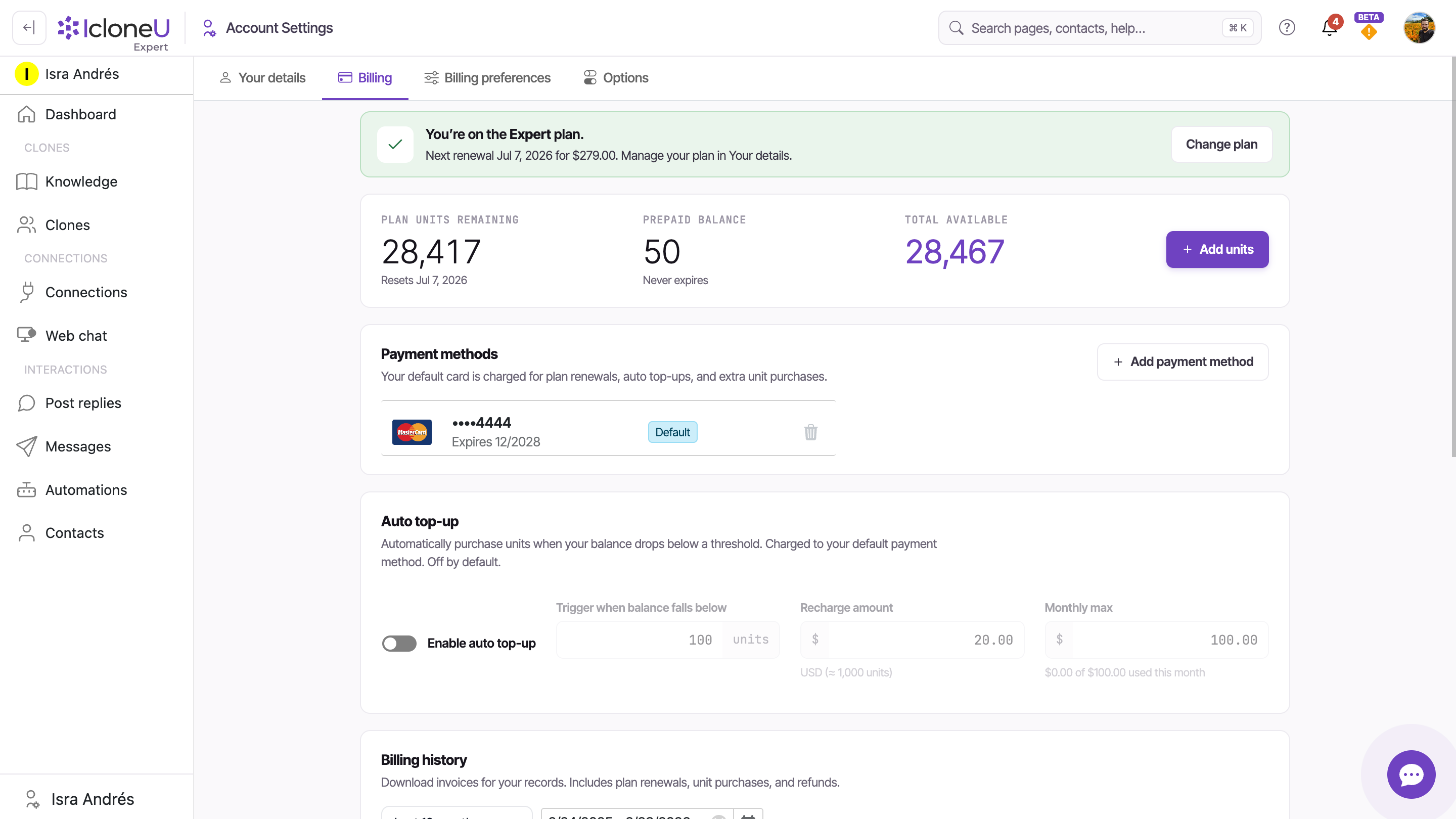
Almost everything money-related sits on one page: Account settings → Billing. That single tab holds your unit balances, your saved cards, the + Add units button for one-off top-ups, the opt-in Auto top-up card and a billing history with View links to the receipts behind your charges. This guide tours each surface so you always know which card gets charged, for what, and where the receipt ends up.
The Payment methods section states it plainly: "Your default card is charged for plan renewals, auto top-ups, and extra unit purchases." Renewals follow your plan's schedule; the other two only happen when you act — a top-up you click yourself, or an Auto top-up you've explicitly opted into (it's off by default).
Find the Billing tab
Two steps from anywhere in the app:
Open Account settings
Click your avatar in the top-right corner and choose Account settings from the menu.
Switch to the Billing tab
Open the Billing sub-tab — it sits between Your details and Billing preferences. Every surface in this guide lives on it.
On a paid plan, a banner across the top confirms which plan you're on and shows the next renewal date and amount, with a Change plan button beside it — so the biggest recurring charge on your card is never a surprise.
The three balance boxes
At the top of the tab, three stat boxes summarise what your Clones have left to spend. (For what actually consumes those units, see Understanding usage and limits.)
| Stat box | What it shows |
|---|---|
| Plan units remaining | Units left in the current monthly cycle, with the reset date on its Resets line |
| Prepaid balance | Units you bought separately — marked Never expires |
| Total available | The sum of the two: everything your Clones can spend right now |
The + Add units button sits right beside the boxes — that's the one-off top-up covered below.
Your payment methods
Below the balances sits the Payment methods section. Its subtitle is the key fact on this whole page: "Your default card is charged for plan renewals, auto top-ups, and extra unit purchases." Each saved card is listed with its brand, last four digits and expiry date, and the card that gets charged carries a Default badge.
To save a new card, start from the + Add payment method button at the corner of the section.
The card will save fine — and charges against it simply happen in pesos. Mexican cards and American Express can only be charged in MXN, so even with your billing country in the United States (USD), IcloneU automatically charges them in MXN: the purchase screen switches to the peso amount and shows a note: "American Express and Mexican-issued cards are charged in Mexican pesos (MXN). The peso amount shown above will be charged to your card." A USD decline is still possible in a few fallback cases — for example, an existing USD subscription renewing against one of these cards; that renewal needs a card that accepts USD, because a subscription keeps the currency it was created in. To keep your new charges coherent in MXN (plus IVA), set your billing country to Mexico: it's the country of your Primary business address under Account settings → Billing preferences. See Billing and payment issues.

A current default card matters most around your renewal date and whenever Auto top-up is on — both charge the default card automatically.
One-off top-ups: + Add units
When you need more units this month — or the balance already hit zero and the Clone went quiet — the fastest fix is a one-off purchase:
Open Billing
Go to Account settings → Billing.
Click + Add units
The button sits beside the three balance boxes at the top of the tab.
Complete the purchase
The charge goes to your default card, and the units land in your Prepaid balance, where they never expire. If your Clone had stopped replying at zero, replies resume as soon as the purchase completes.
Buying ahead is safe: prepaid units never expire, unlike your plan's monthly units, which reset each cycle and don't carry over.
Auto top-up: automatic refills, strictly opt-in
Further down the tab sits the Auto top-up card. Its description says it all: "Automatically purchase units when your balance drops below a threshold. Charged to your default payment method. Off by default." Until you switch it on, IcloneU never auto-charges your card for extra units — at zero, the Clone simply stops replying until the cycle resets or you top up manually.
Turn on the toggle
Flip Enable auto top-up on. The three controls below it become yours to set.
Set the trigger and the recharge
Trigger when balance falls below is the unit count at which a refill fires (the form defaults to 100 units). Recharge amount is the dollar amount of units bought each time (default $20.00, ≈ 1,000 units).
Cap it with Monthly max
Monthly max (default $100.00) is the hard ceiling on auto-charges in a single month — the card shows a running meter against it, e.g. "$0.00 of $100.00 used this month". Auto-charges never exceed it.
TipTreat Monthly max as your cost control: it caps the worst-case spend no matter how busy the month gets.
Leave the toggle off — that's the default. You'll still be warned through the bell icon in the top bar as the balance runs low, and a manual + Add units purchase restores service whenever you choose. The full run-out behaviour is covered in Understanding Clone response limits.
Billing history: past charges and receipts
At the bottom of the tab, the Billing history table records past charges — plan renewals, unit top-ups, refunds — one row per payment across Description, Status, Amount and Created columns. A Default range dropdown and a date-range picker narrow the list, and a row's View link opens the receipt behind its charge.
For downloading those invoices — and for pointing the details printed on them (company name, billing email, tax ID) at the right place via the Billing preferences tab — see Viewing and downloading invoices.
Frequently asked
The one marked Default in the Payment methods section. Per the section's own subtitle, it's charged for plan renewals, auto top-ups, and extra unit purchases.
Once you're on a paid plan, only two charges happen on their own: your plan's renewal (date and amount shown in the banner at the top of Billing) and Auto top-up refills — which only exist if you opted in, since the feature is off by default. On a trial with a saved card there's one more: as the trial banner warns, your default card is charged at the end of the trial unless you cancel first. With Auto top-up off, running out of units never triggers a charge; the Clone stops replying instead.
No. One-off purchases go to your Prepaid balance, which never expires. Your plan's monthly units are the opposite — they reset each cycle, and unused ones don't carry over.
Rows in Billing history have a View link that opens the invoice behind the charge. The Default range dropdown and the date filters help you find older ones — details in Viewing and downloading invoices.
Last updated September 23, 2026 · Plans & Billing