An IcloneU plan is more than a price tag — it's a bundle of meters and included amounts. Units meter every piece of AI work the account does, each tier includes a set number of Connections, and the Team page tracks the people working alongside you. This guide takes the account-wide view: what draws from the unit balance, how the monthly cycle behaves, what each plan includes, and what does — and doesn't — trigger an extra charge.
This guide covers the metering model for the whole account. For the operational side of units — where to watch the balance, the low-balance warnings, and topping up step by step — see Understanding Clone response limits.
Units: how AI work is counted
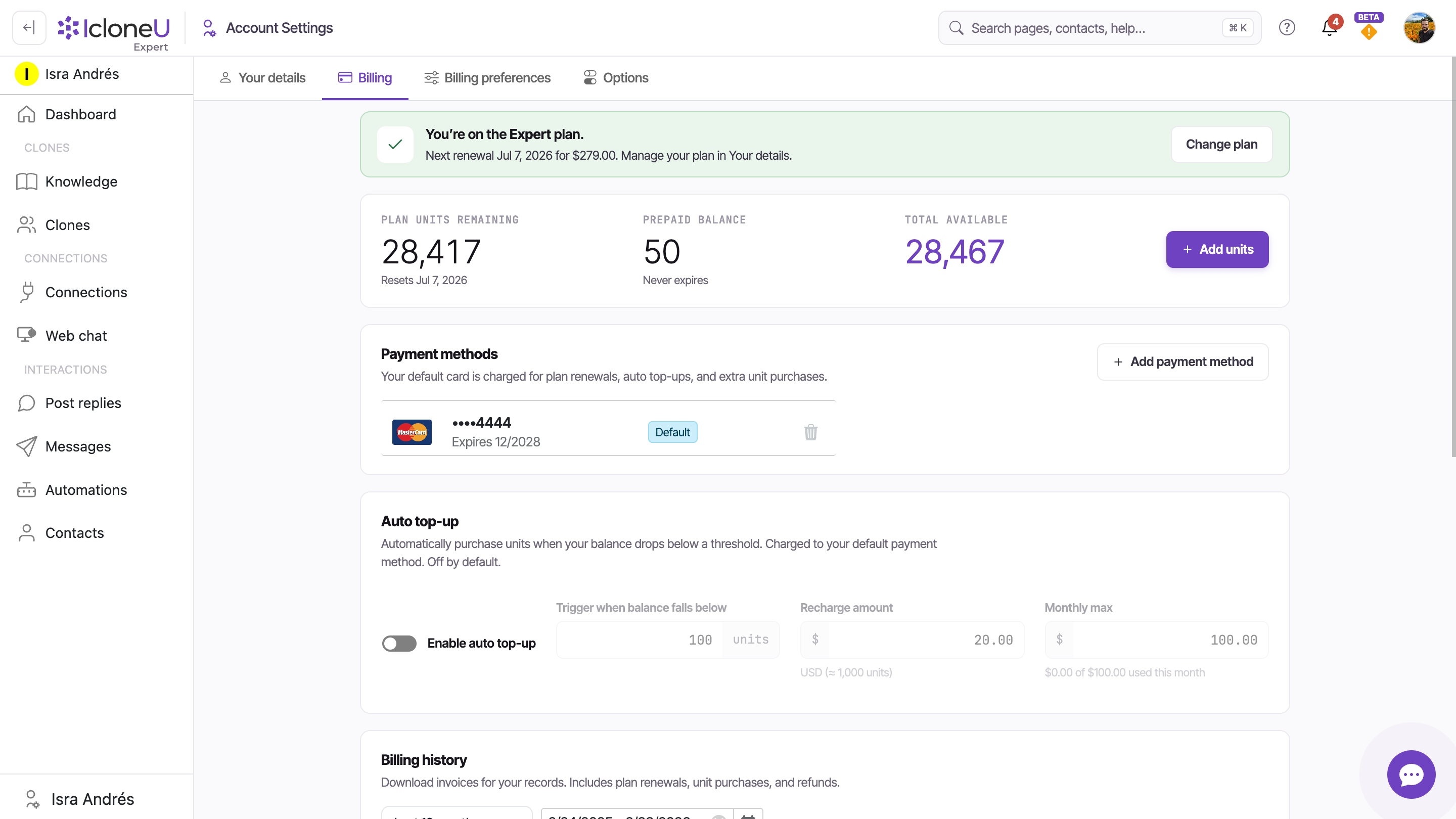
Units are the account's metering currency, defined by the Units included tooltip on the Plans page: "Monthly processing units that power AI conversations, automated responses, and document processing. Additional units are automatically billed if exceeded. Unused units don't carry over to next month." Units are pooled at the account level — the balance lives on Account settings → Billing, not on any individual Clone — and everything below draws from it:
- Clone replies — every reply sent on any connected channel, by any Clone on the account.
- Playground tests — test messages run through the same metered pipeline as live replies; there's no free test mode.
- Document processing — units are consumed when sources are ingested into a Knowledge library, including automatic re-syncs of website and connected sources, not just the first upload.
- Automation runs — each run that involves the Clone or an AI agent node.
- Background AI work — work IcloneU does for you without a click, such as the short description it writes for each new unanswered question on the Dashboard.
The pool that pays is the account you're working in. When you work inside a team, the AI work you trigger there — such as ingesting sources into the team's Knowledge libraries — draws from the team's unit balance, and any pre-ingestion unit estimate shows the team's balance too. Your own Account settings → Billing tab keeps showing your personal account's balance, so don't expect it to move for work you do in the team.
How much does each action cost? There's no flat per-action price. Metering is token-based — the number of units depends on the number of tokens consumed — so cost scales with the size of the input and output: reply length, document size, how much knowledge gets retrieved. Longer or knowledge-heavy work costs more than short replies, and the per-action cost isn't shown anywhere in the Billing or Plans UI — the number varies too much to quote.
Monthly cycles and what triggers an overage
Your plan grants a fixed allotment of units per monthly cycle, and unused units don't carry over — whatever's left at the reset is forfeit, exactly as the Plans tooltip states. If the balance runs out mid-cycle, you have two manual options: buy a one-off top-up with the + Add units button on the Billing tab, or — if you're over the allotment month after month — upgrade to a plan with a bigger one, which is usually the cheaper route. Units you buy with + Add units land in a separate Prepaid balance that never expires — the use-it-or-lose-it rule applies only to the plan's monthly allotment.
The tooltip's phrase "automatically billed if exceeded" deserves a caveat: the only path by which IcloneU automatically charges your card for extra units is Auto top-up, and it's off by default. With it off, hitting zero triggers no charge at all — your Clones simply stop replying until the cycle resets or you buy units manually. With it on, recharges go to your default payment method and never exceed the Monthly max you set.
Connections by plan
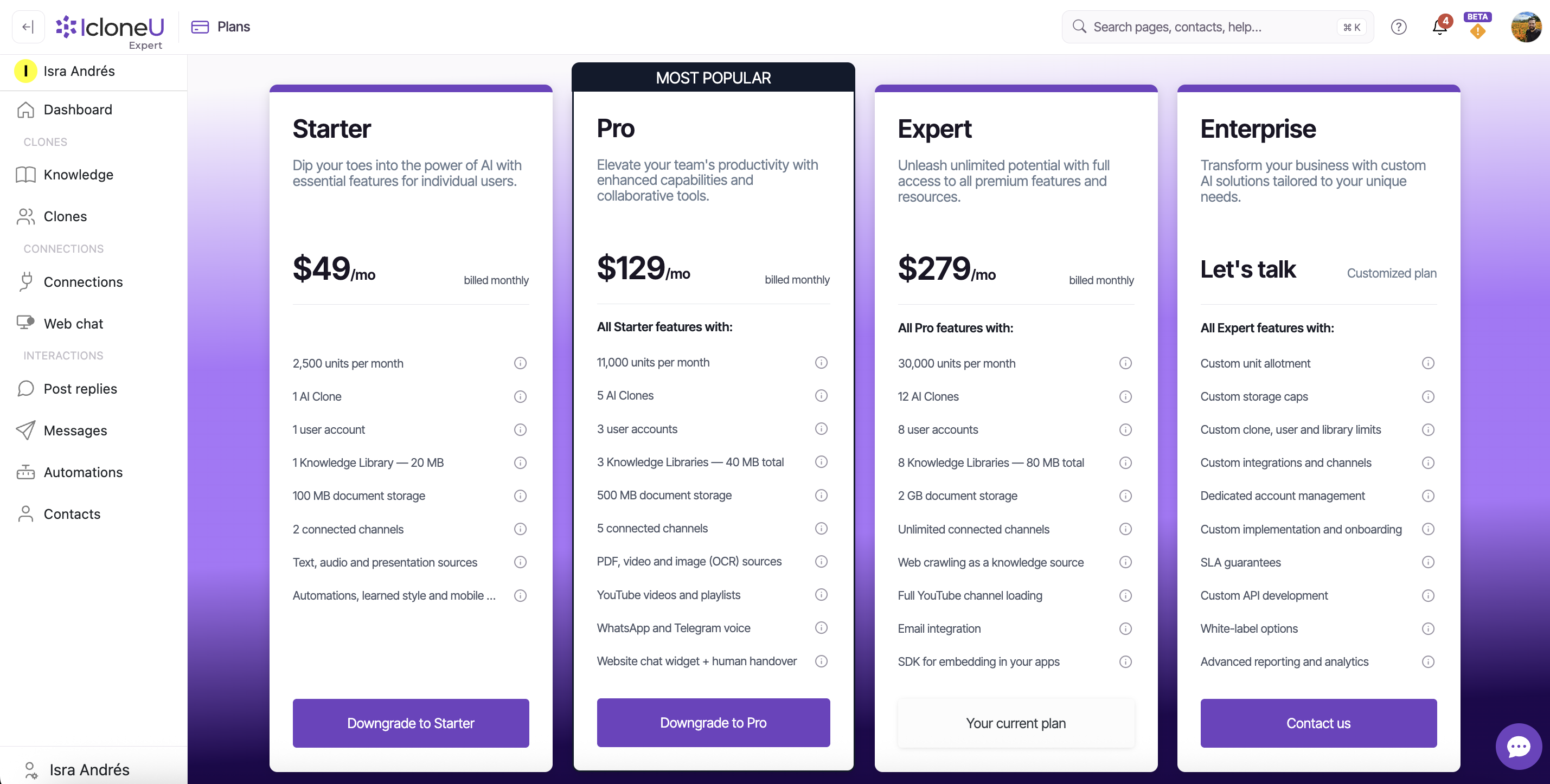
Connections — the channel accounts you link on the Connections page so your Clones can reply there — come in a set number per plan tier. The per-tier card on the Plans page is the reference for yours; these are the numbers it shows:
| Plan | Connections included |
|---|---|
| Starter | 2 |
| Pro | 5 |
| Expert | 8 |
| Enterprise | 12, customized per contract |
Those are the Connections each plan includes, as the Plans page lists them; a higher tier includes more.
Removing a Connection disconnects the account and deletes its settings; the conversation and post history is preserved by default and reattaches if you reconnect the same account later (permanent deletion is a separate opt-in checkbox).
Team members and roles
People are the third dimension. The Team page (avatar menu → Team) lists everyone with access to the account: a members grid with summary counts — total, confirmed and pending invites — plus each member's email, role and last activity. Invite member adds a teammate by email, and Manage roles controls what each person can do: three IcloneU-managed predefined roles (Administrator, Clone editor, Response editor) plus custom roles built from 30 permissions — for each section of the product, a View switch and, for most, a Manage switch — across the Account, Clones, Connections and Interactions groups. The account creator carries the Owner badge.
Yes: the Team entry is in the avatar menu on every plan. Each plan includes a number of user accounts, the Owner included — 1 on Starter, 2 on Pro and 4 on Expert, as the Plans page lists them, and 7 to start with on Enterprise, where the number is set in your contract and managed by the IcloneU team rather than in the app. On Starter, Pro and Expert, Inviting team members explains what happens when an invite goes past that number.
Check where you stand
A full account audit touches three pages — worth a sweep before a plan change or a high-traffic season:
Check your unit balance
Click your avatar in the top-right corner, choose Account settings, then open the Billing tab. Plan units remaining shows what's left in the current cycle along with its reset date. This is your own account's balance — work you do inside a team draws from the team's.
Count your Connections
Open Connections in the left sidebar and count the rows, then compare them with the number your tier includes — your current plan's card on the Plans page (avatar menu → Plan) shows the number.
Review your team
Open the avatar menu and choose Team. The members grid's summary row counts everyone — total, confirmed and pending invites — so you know exactly who has access before the busy stretch starts.
Frequently asked
Yes — units are pooled account-wide: plan units plus any prepaid units (which never expire) are summed as Total available on the Billing tab. Understanding Clone response limits covers living with that balance day to day (watching it, the warnings, topping up); this guide covers the model behind it plus the Connection and Team dimensions.
Only Auto top-up, and only if you opted in — it's off by default. With it off, IcloneU never charges your card beyond the plan price: at zero units your Clones stop replying until the cycle resets or you buy a one-off top-up with + Add units.
No. The Plans tooltip says it outright: unused units don't carry over. Plan capacity is use-it-or-lose-it each cycle. The exception is your Prepaid balance: units you purchase yourself never expire.
Yes — measured live: each Playground reply visibly decremented the unit balance. The Playground uses the Clone's real configuration and the same metered pipeline as production, so there's no free test mode.
Starter includes 2 Connections, Pro 5, Expert 8, and Enterprise 12 to start with, customized per contract; a higher tier includes more. If you remove a Connection you no longer use, its conversation history is preserved by default and relinks if you ever reconnect that account.
Last updated September 23, 2026 · Plans & Billing