A Knowledge library takes far more than PDFs. This page is the complete reference: every file family you can upload, the web and media sources the platform fetches on its own, the bulk-import options for adding many files at once — and how each one is processed into knowledge your Clone can answer from.
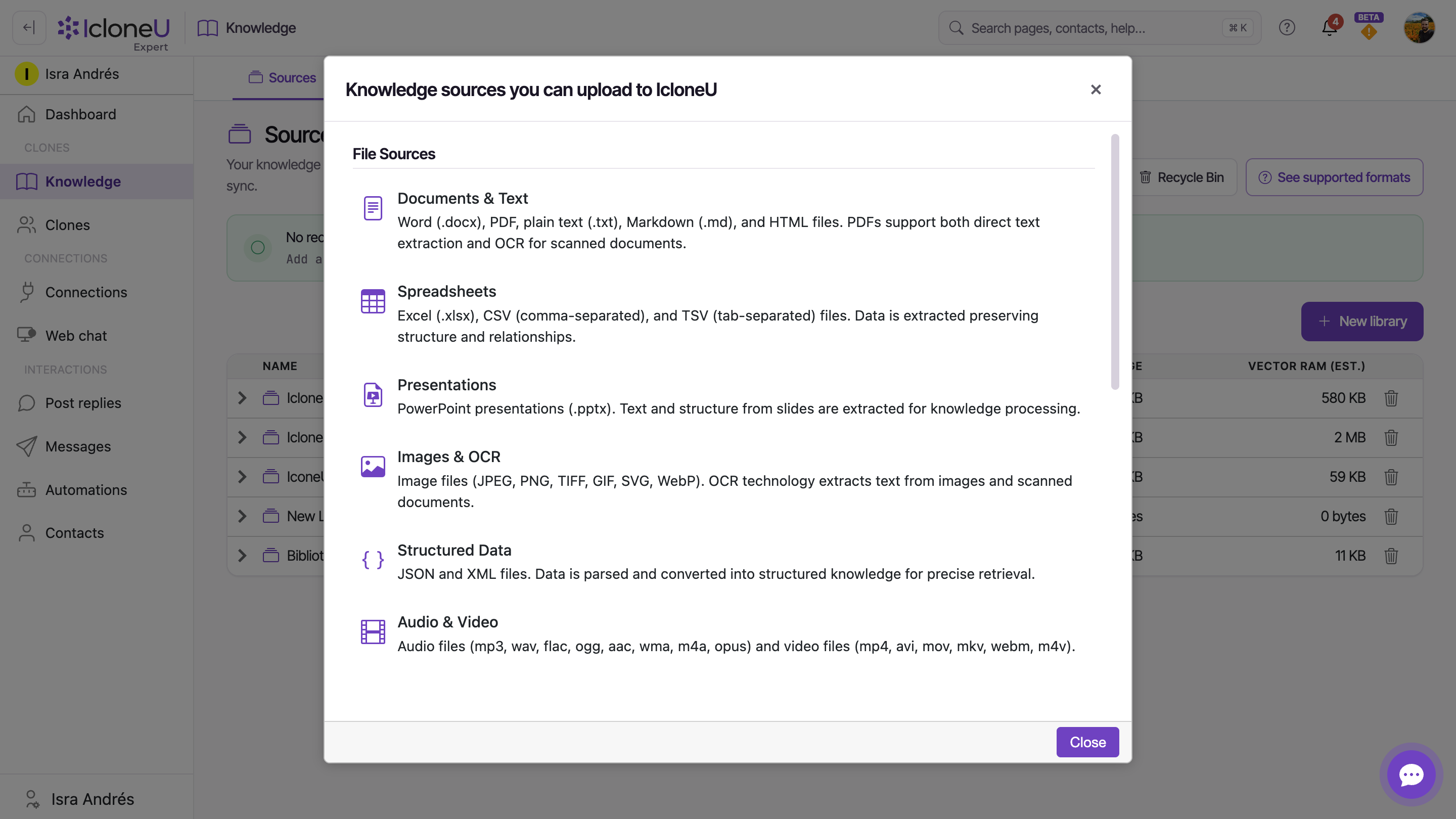
This catalogue mirrors the platform's Knowledge sources you can upload to IcloneU modal. You can always check it in the app: on the Knowledge page, select See supported formats at the top of the Sources tab. If this page and the modal ever disagree, the modal wins.
File sources
Files are the most common sources. Six families are accepted, and each is turned into text one way or another — extraction for documents, OCR for images and scans, transcription for audio and video. The table reproduces the modal's catalogue. (For the click-by-click upload flow, see Adding documents and files.)
| Family | Formats | Notes |
|---|---|---|
| Documents & Text | .docx, PDF, .txt, .md, HTML | PDFs support both direct text extraction and OCR for scanned documents |
| Spreadsheets | .xlsx, CSV, TSV | — |
| Presentations | .pptx | — |
| Images & OCR | JPEG, PNG, TIFF, GIF, SVG, WebP | OCR technology extracts text from images and scanned documents |
| Structured Data | JSON, XML | — |
| Audio & Video | Audio: mp3, wav, flac, ogg, aac, wma, m4a, opus; video: mp4, avi, mov, mkv, webm, m4v | Content is automatically transcribed to text |
Websites and media
Not everything worth knowing lives in a file. Two source types let the platform fetch content for you — point it at the right URL and it does the rest:
- Website Crawling — give the crawler a starting URL and it extracts page content, downloads linked files, and discovers and transcribes embedded media from YouTube, Vimeo, Dailymotion, Facebook, TikTok, SoundCloud, Spotify, iVoox, podcast feeds and HLS/DASH streams.
- YouTube Channels — give it a channel or playlist URL and the platform imports every video and transcribes each one.
Setting up a crawl has a guide of its own — see Adding website URLs for the step-by-step.
Folders and archives
Have dozens — or hundreds — of files? Two bulk options save you from uploading them one by one. In both cases, every file inside becomes its own source, processed under the file-family rules above:
- Local Folders — upload an entire directory in one operation.
- Compressed Files — ZIP, RAR, 7z, TAR and GZ archives. Contents are auto-extracted; the archive itself is never indexed as a single blob.
Files inside an archive that aren't in a supported format are skipped; the supported files still come through. If some files don't show up, compare them against the catalogue above and check the Activity sub-tab to see how each file was handled. Other archive formats — .zipx, .cab — aren't accepted.
A ZIP inside a ZIP? How nested archives are handled isn't documented — don't rely on it. If a nested file matters, flatten the archive one level before uploading.
Limits and practical caveats
Two limits are documented, and they're generous:
| Limit | Value |
|---|---|
| Maximum size of a single file | 2 GB |
| Number of sources per library | No limit |
- OCR reads text, not pictures. It extracts text characters from images and scans — it won't describe a chart or a photo. If your Clone needs an image explained, write the description as a separate text source.
- OCR quality tracks scan quality. Resolution, contrast, font and language all affect accuracy; low-resolution or stylised text can be misread, so spot-check critical scans in the Activity sub-tab.
- Very large archives can fail at upload. If one does, split it into smaller archives and upload those instead.
- Files a website crawl finds are capped lower. A crawl downloads a file your pages link to only up to 50 MB, and skips files kept on another domain or on a file address such as a cdn. subdomain. A bigger one is listed under Errors in the crawl's Activity details as File too large — upload it directly instead, where the 2 GB limit applies.
Check a file before you upload
A thirty-second check saves a failed upload. Before adding a file:
Confirm the format is in the catalogue
Check the file's extension against the tables above — or open the live list: on the Knowledge page, select See supported formats at the top of the Sources tab. A file with no extension in its name isn't refused at upload; IcloneU tries to work out its type when it processes it, and if that fails, add the right extension and upload it again.
Make sure it's on your device
A file in iCloud Drive or OneDrive can show on your computer without really being downloaded: it's still only in the cloud, and the upload can't read it. Its row then says "Couldn't read this file. If it lives in iCloud Drive or OneDrive, download it to your device first, then try again." Download the file, then upload it again.
For scans and images, check readability
If you can't read the text at normal zoom, OCR will struggle too. Re-scan at a higher resolution — 300 DPI is a common minimum for reliable OCR.
If it's rejected anyway, re-export it
A rejection like "The file format … is not supported" on a listed extension usually means the file was re-saved in a container format that shares the extension but uses a different internal encoding. Re-export from the original application and upload again.
Frequently asked
Yes. PDFs are processed with both text extraction and OCR, so a scanned contract with no text layer still gets read. Image files (JPEG, PNG, TIFF, GIF, SVG, WebP) are OCR'd too — handy for screenshots and photos of paper documents.
No. Video is transcribed from its audio track; visual content isn't analysed unless OCR happens to capture on-screen text. If a video's visuals carry information your Clone needs, write it up as a separate text source.
They're skipped — the supported files still become sources. If something you expected is missing, compare it against the file-sources catalogue and check the Activity sub-tab for per-file errors.
A single file can be up to 2 GB, and there's no limit on the number of sources a library can hold. The cap applies per file — a large library is simply many sources, each within the 2 GB limit. Files a website crawl downloads from your pages stop at 50 MB each; upload bigger ones directly.
Last updated September 23, 2026 · Knowledge Library