When customers write and nothing comes back, the temptation is to assume the AI is broken. In practice the Clone is usually fine — something in the chain around it is switched off, unattached, out of fuel or deliberately holding the reply. This guide is the cross-channel triage: seven checks, ordered from fastest to deepest, each pointing at the exact switch to look at. Most silences are solved by check 1, 2 or 3.
First, find which side is broken
One look at the Messages page splits the problem in half: did the customer's message reach IcloneU at all?
Open Messages
Click Messages in the left sidebar. It's the unified inbox of every conversation your Clones have across all connected channels.
Search for the contact
Use the search box above the conversation list to find the customer who isn't getting replies, and open their conversation.
Read the verdict
The inbound message appears but no reply went out — the channel is delivering fine; the problem is usually on the Clone's side. Work through checks 3 to 6 below — and check 7 if the connection's row reads Reconnect required. One exception first: if a workflow handled the message — it matched a workflow's trigger, or answered a workflow that was waiting for a reply, including one your Clone started during the conversation — Messages shows the customer's messages but not what the workflow sent, because workflow replies don't appear there today. Look at your workflows under Automations before blaming the Clone. The inbound message doesn't appear at all — for a direct message, that means IcloneU never stored it: the Connection is switched off (check 1 — its row on Connections reads Disabled), it has no Clone (check 2 — the row reads No Clone), or the channel isn't delivering (check 7).
Messages carries messaging-channel conversations — Web chat, Telegram, WhatsApp, Facebook and Instagram DMs. Post comments on Facebook, Instagram and YouTube never appear here, even when everything is healthy: comment management lives in the separate Post replies surface. For a comment with no public reply, look in Post replies and go to check 4 — don't conclude a channel-side fault from its absence in Messages.
| Symptom | Most likely cause | Go to |
|---|---|---|
| Inbound shows in Messages, no reply at all | Units at zero, a human took over, the connection shows Reconnect required — or a workflow answered (its replies don't show in Messages) | Checks 3, 5, 7 |
| A DM shows in Messages with an unsent Clone reply — held, 'In review', or 'Undeliverable' | Direct-message review is on: the reply awaits your approval, will auto-send after the review delay, or expired unapproved past the 24-hour window | Check 4 |
| A direct message never appears in Messages | The Connection is switched off (its row reads Disabled — a new Facebook, Instagram or YouTube Connection starts that way) or has no Clone (its row reads No Clone), or channel-side: broken webhook or revoked permissions (an expired authorization only looks like this when event delivery itself has stopped) | Checks 1, 2, 7 |
| A comment on Facebook, Instagram or YouTube gets no public reply | The reply is held for your authorization — comments are managed in Post replies, not Messages | Check 4 |
| A comment on a Facebook Live gets no public reply | The 'Respond to live broadcasts' toggle is off (default) — Live comments are dropped | Check 4 |
| Clone answers, but with 'I don't have that info' | Knowledge settings: library-only mode with no match, or matching set too tight | Check 6 |
Check 1 — Is the Connection turned on?
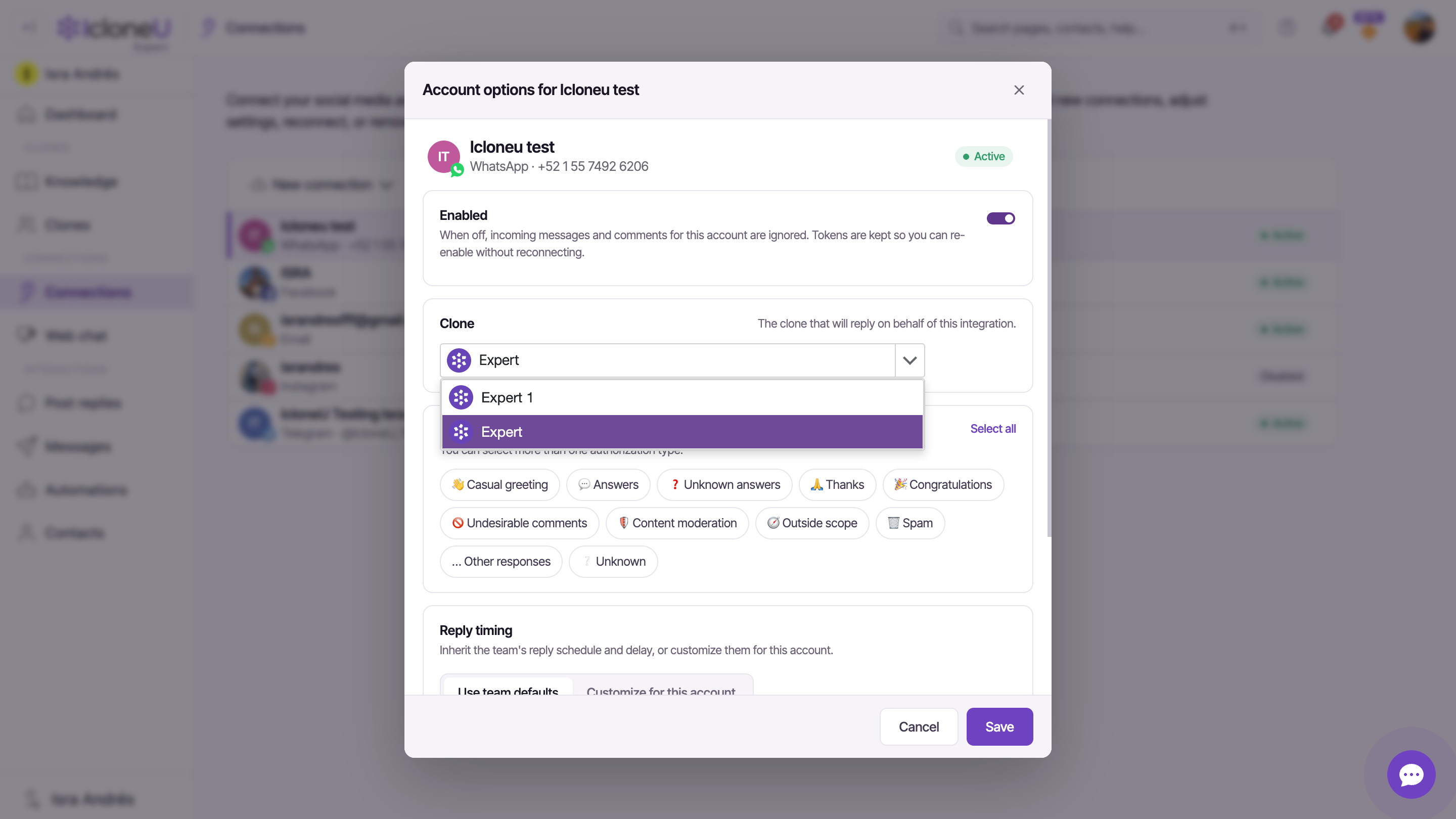
Every Connection has an Enabled toggle, and its own description spells out exactly what "off" means: "When off, incoming messages and comments for this account are ignored. Tokens are kept so you can re-enable without reconnecting." A disabled Connection produces precisely the symptom you're chasing — inbound traffic ignored, no replies — and it's the easiest thing to rule out. It also stores nothing, so while it's off nothing new shows up in Messages. What "ignored" means exactly — and which channels can recover messages that arrived while off — is covered per channel in Assigning a Clone to a platform.
Open Connections
Click Connections in the left sidebar and select the row for the silent channel. Its status tells you at a glance: Disabled means the Connection is switched off.
Open the settings panel
Click the Settings (gear) button in the toolbar. The Account options panel for that Connection opens — the same panel that appears right after you first connect a channel.
Check the Enabled toggle
If Enabled is off, switch it on and click Save. On Facebook, Instagram and YouTube, Save stays greyed out until you also switch on the AI identifier ✨ confirmation — add the identifier to that profile first (Adding the AI identifier). Because the authentication tokens were preserved while it was off, no reconnection or re-authorization is needed — handling resumes for new incoming messages.
A new Facebook, Instagram or YouTube Connection starts switched off. The panel that opens right after connecting shows Enabled on, but nothing is saved until you switch on the AI identifier ✨ confirmation and click Save. Close that first panel with Cancel or × and the Connection stays Disabled from day one — and on Facebook and Instagram every message and comment that arrives meanwhile is lost for good. If a newly connected channel never answered anything, this is the first suspect.
The Enabled toggle is also the intended way to pause a Clone on one channel — during a campaign, an incident or a holiday — without tearing the Connection down. Don't confuse it with Remove, which disconnects the Connection and deletes its settings — the conversation history is kept by default and reattaches if you reconnect the same account.
Check 2 — Is a Clone attached to the Connection?
A Connection only answers through the Clone attached to it. In the same Account options panel, the Clone dropdown — described as "The clone that will reply on behalf of this integration" — names who that is. The dropdown lists the Clones that exist on your account and has no "none" option, but a Connection can still end up with no Clone attached, and on a Clone-less Connection nothing answers — incoming messages aren't even stored, so they never show up in Messages (only a workflow bound to the Connection can still run, while the Connection is switched on). Connecting a channel attaches your account's oldest Clone automatically, so this happens when your account had no Clone at the time, or when the Connection's Clone was deleted on the Clones page without choosing a replacement (which also switches the Connection off) — the Connections page then shows No Clone.
Open the Connection's settings panel
On Connections, select the silent channel's row and click Settings (gear).
Confirm the Clone dropdown has a selection
Make sure the Clone dropdown actually shows the Clone you expect — not an empty field.
Select and Save
Pick the Clone that should answer on this channel, switch Enabled on if it is off (on Facebook, Instagram and YouTube together with the AI identifier ✨ confirmation), and click Save. New incoming messages will route to it from then on.
Check 3 — Have you run out of units?
Every Clone reply is paid for in units, and when the balance hits zero with Auto top-up off (the default), the Clone stops replying until the next monthly reset or until you buy more. Nothing errors — the Clone simply stops, and because units are account-level, expect the silence to hit every channel at once. IcloneU does warn the account owner first: low-balance notifications arrive through the owner's bell icon in the top bar as the balance approaches zero — teammates don't get them.
Open Account settings
Click your avatar in the top-right corner and choose Account settings.
Read the balance on the Billing tab
Open the Billing sub-tab and look at Plan units remaining. If it reads zero — and your prepaid balance is empty too — you've found the silence.
Restore service
Click + Add units at the top of the Billing tab and buy a one-off top-up — replies resume as soon as the purchase completes. To stop this happening again, consider Auto top-up (off by default) or a bigger plan.
Because units are account-level, a zero balance is the suspect when every channel goes quiet at the same time — that's what distinguishes this cause from the per-Connection ones above. For how units are counted and the three ways to add capacity, see Understanding Clone response limits.
Check 4 — Are replies being held for your authorization?
On comment channels — Facebook, Instagram and YouTube post comments — the Connection's Response authorizations required for section decides which kinds of replies go out on their own. Any category you tick (Answers, Casual greeting, Thanks and so on) is held for your authorization instead of being auto-sent; unticked categories post automatically. A Clone that looks silent on your posts may simply be waiting for you to approve what it wrote.
Two things to know before you blame this check: on post comments the ticked categories always gate. On direct messages — Telegram, WhatsApp, Facebook and Instagram DMs — they apply only when the connection's Direct-message review is set to Hold until approved or Auto-send after a delay; with the default, Send immediately, DMs auto-reply as before. So held authorizations can explain a quiet comments section — and, when review is on, a quiet DM inbox too: open the conversation in Messages and approve the held reply from the thread.
With Hold until approved, the held reply shows approve and cancel controls in the thread — on WhatsApp, Facebook and Instagram DMs it also carries an amber approve before … pill, because those platforms stop accepting replies 24 hours after the customer's last message. Miss that deadline and the reply flips to Undeliverable — it can no longer be sent, though a new message from the customer starts a fresh window. With Auto-send after a delay, the reply shows an In review pill and sends itself after the configured minutes unless you edit, cancel or send it first.
If you want a comment category to go out without your involvement, open the Connection's settings panel, untick that category under Response authorizations required for and click Save — unticked means auto-sent.
One category of comment is skipped before authorizations ever apply: comments on a Facebook Live broadcast. The Respond to live broadcasts toggle in the Connection's Post options is off by default, and while it's off IcloneU drops Live comments entirely — a new live never appears in Post replies and an already-known one never gets a public answer, even though the comment is visible on Facebook. If a Facebook Live is the one place your Clone stays silent, open the Connection's settings panel and switch Respond to live broadcasts on. Normal posts, photos and non-live videos are unaffected.
Check 5 — Has a human taken the conversation over?
While a team member is handling a conversation, the Clone is paused on that conversation — it stops auto-replying so the human and the AI never talk over each other. If someone took a conversation over and forgot to hand it back, that one thread stays silent even though everything else works.
Open the conversation in Messages
Find the affected conversation and look at its header. "IcloneU is handling this conversation" means the Clone is on duty; "Agent handling" with a team member's name means a human has it and the Clone is paused.
Hand it back to the Clone
Click Return to AI in the header. The Clone resumes answering on that conversation immediately — taking over and handing back are non-destructive and fully reversible.
Sweep for forgotten handovers
Use the conversation-type filter at the top of Messages. All active handovers lists every conversation an agent is handling, whoever holds it, so one person can sweep the whole team's; All pending assignment lists the ones still waiting for an agent, and My active handovers only those handed to you. Tick the forgotten ones and click Return Selected to AI to hand them all back at once. That also releases conversations another agent is holding, which a conversation's own Return to AI button can't do: only the agent handling it sees that button.
Check 6 — Is Knowledge making the Clone refuse?
Sometimes the Clone is replying — but every answer is a variation of "I don't have that info", which from the customer's side feels like silence. That's not an outage; it's the Clone's Knowledge tab doing exactly what it was told. Three settings interact:
- Sources still processing — the Clone can't answer from a source until it has finished processing. On the Knowledge page, a file you upload shows Queued, with its name, in a strip above the library's list, then appears in the list as its own row once it's processed; a single file never gets a status label. A website's row shows Queued and a live count, and can wait at Review Items for you to choose the pages, which aren't processed at all until you click Process (N); it ends on Ready.
- Answer from library only — with this toggle ON, the Clone is forbidden from falling back to general knowledge: when the library has no match, it says "I don't have that info" instead of improvising. Accurate by design, but on a thin library it refuses a lot.
- How closely answers must match — the four-position slider (Loose / Balanced / Strict / Exact) controls how tight a library match must be before the Clone uses it. Strict or Exact on a small library can effectively silence it; Balanced is the default and the right starting point.
The classic version of this trap: two Clones share one library, the support Clone is set to Strict with Answer from library only on, and it "stops working" while its sibling chats happily. Open the silent Clone's Knowledge tab, try Balanced, confirm the library's sources have finished processing — and remember the tab uses explicit save: nothing applies until you click Save changes.
Check 7 — Channel-side faults and escalation
If the Connection is on and has a Clone (checks 1 and 2) and the customer's direct message still never appears in Messages (the step-zero test — post comments never show there by design; they live in Post replies), no setting inside IcloneU will fix it — the channel isn't delivering events to the platform. Broken webhooks and revoked platform permissions produce this shape. An expired authorization can produce either shape: when the channel keeps delivering events, IcloneU deliberately keeps storing the inbound messages — so they still appear in Messages — but stops generating replies and running automations until you reconnect, so no capacity is spent on replies that could never send. Look for Reconnect required on the connection's row in Connections; reconnecting resumes handling automatically. Social media connection issues walks through re-authorizing and repairing each channel.
One channel-family rule worth knowing: on WhatsApp, Facebook Messenger and Instagram DMs, free-form replies are only allowed inside the 24-hour window after the customer's last message — outside it, the Clone can't simply answer, and a reply held for review that outlives the window expires as Undeliverable. The WhatsApp guide covers the window and the template-message way around it.
Walked all seven checks and it's still silent? Contact support with: the Connection's channel and handle or number, the affected contact, the timestamp of an inbound message that got no reply, and screenshots of the Connections page, the conversation in Messages, and the Clone's Knowledge tab. That set lets support reproduce the trail without a round of follow-up questions.
Frequently asked
A useful split: the Playground exercises the Clone itself — identity, personality, knowledge — without any channel in between. If it answers there, the Clone's own configuration is working, and the silence almost certainly lives in the channel chain: the Connection's Enabled toggle (check 1), the Clone attachment (check 2) or the channel-side delivery (check 7).
No. The toggle's own description says it: incoming messages and comments are ignored while it's off, and the tokens are kept so you can re-enable without reconnecting. The more destructive action is Remove, which disconnects the Connection and deletes its settings; the conversation history survives by default and only goes for good if you tick the delete-history option in the confirmation dialog.
It's behaving as configured. That message is the documented behaviour of Answer from library only when the library has no match for the question. Either add the missing content to the library, loosen How closely answers must match toward Balanced, or turn the toggle off so the Clone may fall back to general knowledge — and click Save changes after any of those.
Two clean ways, by scope. For one whole channel: switch the Connection's Enabled toggle off — tokens are kept, so flipping it back on later needs no reconnection. For one conversation: take it over in Messages; the Clone pauses on that thread while you handle it, and Return to AI puts it back on duty.
Last updated September 23, 2026 · Troubleshooting