A connection that worked yesterday can quietly break today: a token expires, a permission changes on the provider's side, or something shifts on the channel account itself. The good news is that most breakages have a one-click first response — Reconnect — plus a short list of channel-specific checks for when that's not enough. This guide shows you how to spot a broken connection, repair it safely, and understand what Remove really does before you reach for it.
If every channel has gone quiet, the cause is more likely the Clone or your unit balance — work through My AI Clone isn't responding first. If a single channel stopped while the others keep replying, you're in the right place.
How a broken connection shows up
A broken connection rarely announces itself — the platform keeps running and the channel just goes silent. Watch for these signals:
- New customer messages stop appearing on the Messages page for that channel, while other channels keep flowing. One exception: when the cause is an expired authorization on a channel that delivers by webhook (Facebook, Instagram, WhatsApp, Telegram), incoming messages keep arriving and are saved — only the replies stop. Your Clone going silent is the symptom you can rely on.
- Your Clone stops replying on that channel even though it replies fine everywhere else.
- The connection's row looks off on the Connections page. When the cause is an expired authorization, it's unambiguous: the accounts under that connection show a Reconnect required pill, and the toolbar's Reconnect button is highlighted when you select one. On Facebook, Instagram and WhatsApp the same pill also appears when Meta reports that the Page, Instagram account or WhatsApp Business Account behind the connection is gone — deleted, or no longer shared with IcloneU — even though the token still works; hover the red marker on the account's picture to see which. Either way the pill covers the whole connection — every Page, account or number under it — and on all of them messages are stored but the Clone doesn't reply and automations don't run until someone reconnects; IcloneU also posts one Connection disconnected notice under the bell icon in the top bar. For other failure classes the visuals vary, so treat the silence itself as the primary signal.
Behind the scenes the usual culprit is authentication. OAuth channels (Facebook, Instagram and WhatsApp via Meta; YouTube via Google) depend on tokens that can stop working: the grant was removed in the provider's settings, or — on Meta's channels — the granting admin changed their password, lost their Page role, or Meta proactively revoked access after a policy event. Providers can also change or deprecate API permissions, which invalidates existing tokens. In every one of these cases the fix is the same — re-authorise via Reconnect. Meta's channels add one cause that isn't the token at all: the Page, Instagram account or WhatsApp Business Account itself was deleted, or is no longer shared with IcloneU. Reconnect and select it again in Meta's flow; if it was deleted, reconnecting can't bring it back: remove its row (for a WhatsApp Business Account, the row of each of its numbers), then Reconnect any other Page or account under the same connection that still shows the pill (reconnecting before you remove the deleted one flags the connection again). While a connection is waiting for a reconnect, IcloneU limits the damage: incoming messages on webhook channels are still stored so no history is lost, and the Clone and automations pause instead of spending units on replies that could never be delivered. Replies that were already queued are held, not failed. After you Reconnect, everything — AI replies, automations and the held replies — resumes on its own; there's nothing to re-enable.
Reconnect first — Remove is the bigger step
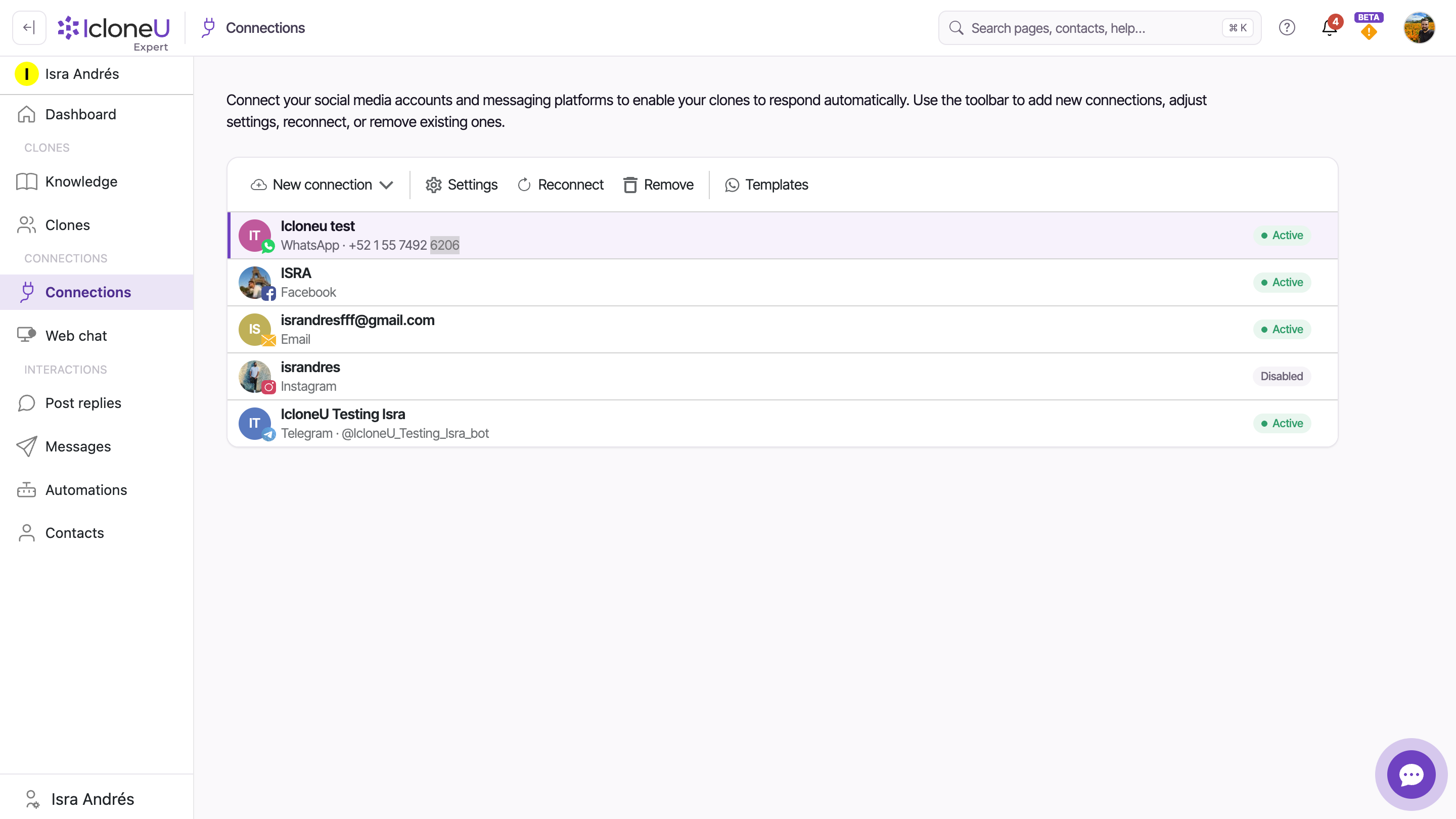
The Connections toolbar offers two repair-adjacent buttons, and they could hardly be more different. Reconnect re-runs the channel's sign-in to refresh IcloneU's credentials, keeping the connection and its history in place. Remove tears the connection down — disconnecting the account and deleting its settings, while the conversation record is preserved for a reconnect. There's also a gentler state to rule out first: the settings panel's Enabled toggle.
| Action | What it does | What survives |
|---|---|---|
| Enabled toggle (off) | Pauses automated handling — incoming messages and comments are ignored | Everything: tokens are kept, so you can re-enable without reconnecting |
| Reconnect | Re-runs the channel's sign-in so IcloneU gets fresh credentials | The connection, its settings and its conversation history |
| Remove | Disconnects the account and deletes its settings | The conversation record — preserved by default and relinked if you reconnect the same account (permanent deletion is an opt-in checkbox) |
If someone simply switched the connection off, open its settings panel, flip Enabled back on and Save — the toggle's own description promises that "tokens are kept so you can re-enable without reconnecting". For a genuinely broken connection, run Reconnect:
Open the Connections page
Select Connections in the left sidebar and find the affected connection's row.
Select the row and click Reconnect
Click the connection's row, then hit Reconnect in the toolbar.
Complete the channel's sign-in again
Re-authorising means going through the same flow as connecting from scratch: Meta's login for Facebook, Instagram and WhatsApp, Google's consent screen for YouTube, and the bot-token popup for Telegram. Sign in with the same account you connected with originally, and keep every requested permission ticked.
TipPick the same Page or account the connection was created for — choosing a different one creates a separate connection instead of repairing this one.
Verify and test
Back in IcloneU, confirm the connection looks healthy again, then send a test message from an account that isn't the channel's admin — admin-to-own-account messages don't always travel the same path your customers use. The message should land on the Messages page and your Clone should reply. It's also worth opening Settings once to confirm your Clone is still selected and Saved.
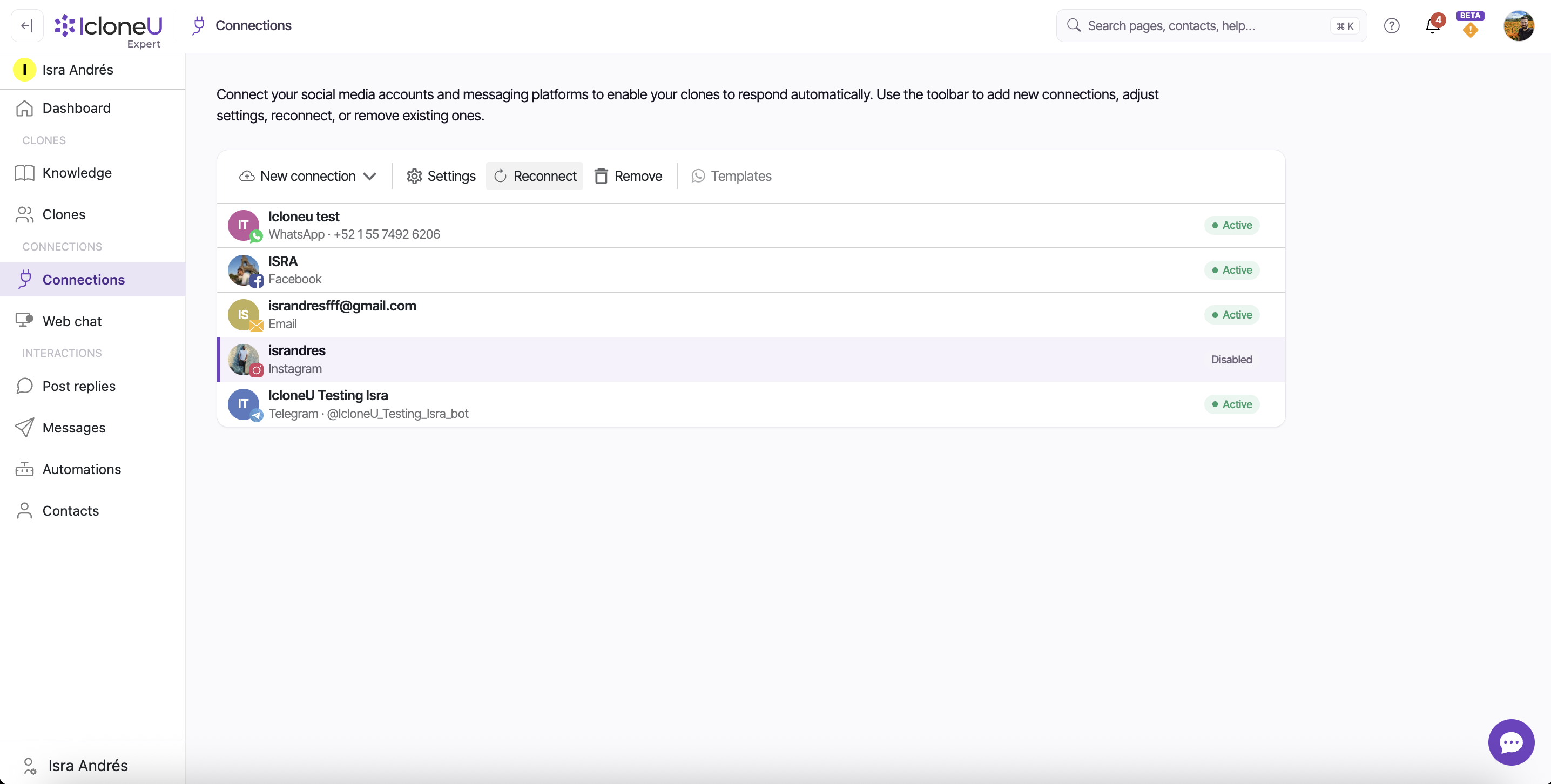
The Remove dialog disconnects the account and deletes its settings, while your conversation and post history is preserved and reattaches automatically if you reconnect the same account later. Permanent deletion only happens if you tick the separate opt-in checkbox — and only then can't it be undone. Messages does look empty for that channel while the connection is out: the preserved history is invisible until you reconnect. Removal still has consequences, so treat Remove + New connection as the move after repeated Reconnects fail:
- Contacts always survive. Removing a connection never deletes contacts — those are only removed when the whole account is deleted.
- Comment and post metrics read zero while the connection is out. Dashboard numbers that hang off posts (like pending approvals) drop to zero; conversation-based numbers stay. Everything returns when you reconnect the same account.
- There's no retention window or recycle bin for connections. Recovery is reconnecting the same account — which relinks the preserved history automatically — not a support request.
- Queued and pending-approval replies for that connection are never sent. They don't fail loudly; they simply stop being deliverable. Approve or discard anything pending before removing.
Instagram: the Facebook Page requirement
A common Instagram failure isn't a token at all. IcloneU connects Instagram through Meta's Facebook Login for Business path, which requires your Instagram Business or Creator account to be linked to a Facebook Page you administer. Linking Instagram to your personal Facebook profile (Meta's Accounts Center link) is not enough: Facebook's sign-in completes, but Meta reports that no Instagram accounts are linked to your Facebook account — and there's nothing to pick in IcloneU. The fix is quick and verified:
Confirm the account type
Your Instagram account must be Business or Creator — personal accounts aren't eligible for Meta's messaging API. Switch to a professional account in the Instagram app's settings if needed.
Create a Facebook Page on the same Facebook account
If you only have a personal profile, create a Page — it's the anchor Meta requires for business messaging.
Link Instagram from the Page's settings
Open the Page's Settings → Linked accounts → Instagram and connect your Instagram account. It links in one step, and the panel shows it as connected with a toggle allowing access to Instagram messages — leave that toggle on.
Run the connect flow again
Back in IcloneU, open Connections, select your Instagram connection and click Reconnect (or New connection → Instagram if it never connected at all). After Facebook's sign-in you'll now see your account under "Your account was successfully authenticated. Choose the Instagram account that you want IcloneU to connect to." — click Connect, review the account options panel and Save.
For the full connect walkthrough, see the Instagram Connection Guide.
WhatsApp: when messages stop arriving
WhatsApp delivery runs on Meta webhooks, so troubleshooting is about finding which side dropped the ball. Work down this list:
Pin down the symptom
Open Messages and look for the customer's message. If it arrived but got no reply, skip to step 4 — delivery works and the problem is on the reply side. If it never appeared, continue: the incoming pipeline is the suspect.
Check the connection's health in IcloneU
On Connections, read the WhatsApp connection's row. Disabled or No Clone means IcloneU stores nothing that arrives (those messages are lost): open Settings, pick a Clone if there is none, switch Enabled on and Save. If it reads Reconnect required, or Active but you suspect stale credentials, run Reconnect as described above.
Check the webhook on Meta's side
Webhook delivery is owned by Meta. If you have access to Meta Business Manager, it's worth checking your number's webhook configuration in WhatsApp Manager for recent delivery failures. If Meta shows deliveries succeeding while nothing reaches IcloneU, contact support with the customer's phone number and a timestamp.
If messages arrive but the Clone stays silent
If the row reads Reconnect required, IcloneU's access was revoked: messages keep arriving but nothing is answered until you Reconnect. If a workflow handled the message, it may well have been answered: Messages doesn't show workflow replies today. Otherwise open the conversation: a reply with approve/cancel controls or an In review pill is waiting on Direct-message review. Then check the timing: if the customer's last message is more than 24 hours old, WhatsApp's free-form reply window has closed and replies need an approved template instead.
NoteDetail on the 24-hour window and message templates lives in the WhatsApp Connection Guide.
If Meta reports unsettled payments
A banner at the top of Automations and Contacts → Broadcasts saying Meta reports unsettled payments on the WhatsApp Business account means Meta has stopped delivering some or all of that number's messages (Meta error 131042) — and a reply it refused still looks sent in Messages. The Dashboard's health check shows the same thing as a failing WhatsApp account row, with Meta's own error text and no Fix button. Fix the account's payment problem in Meta (Meta's error page lists causes such as no payment account attached, a credit line over its limit or a suspended account): Open Meta billing takes you to Meta's billing page. Fixing it doesn't clear the banner by itself — it clears on its own once a message from that number is delivered again and the last payment failure is more than an hour old.
Telegram and YouTube quirks
Telegram authenticates with a bot token instead of OAuth, which makes its failure modes refreshingly different:
- Your bot and its token survive a disconnect. Disconnecting in IcloneU only unregisters the platform's link to the bot — the bot keeps existing on Telegram, and its token stays valid unless you revoke it at @BotFather. Reconnecting is just pasting the token again; the popup even tells you: "You are reconnecting to an existing bot. If you have changed the token in Telegram, enter the new token here to update it."
- Rotated the token? If you regenerated it at @BotFather — say, after a suspected leak — the old token dies and the connection breaks. Reconnect and paste the new token.
- One webhook per bot. Telegram allows a single webhook per bot, so if another tool claimed it, updates stop reaching IcloneU. Reconnecting in IcloneU re-registers its webhook — the standard recovery.
YouTube re-authorisation runs through Google's consent screen — the same flow as connecting from scratch. Two things to know: IcloneU polls YouTube for new comments rather than receiving webhooks, so a fresh comment can take a little while to appear (that's not a broken connection); and the consent screen hides a trap:
The YouTube access checkbox is not checked by default. Leave it unticked and the connection appears to succeed — but the Clone never sees a single comment. It's a common silent failure for YouTube connections; whenever you reconnect, make sure the box is ticked before you approve.
Duplicate or conflicting replies: another tool on the same Page
The opposite of silence is a channel that replies twice — or with answers that contradict each other. The usual cause isn't a bug in IcloneU: it's a second automation tool (commonly ManyChat) connected to the very same Facebook Page or Instagram account.
Meta delivers every comment and message to all apps subscribed to that Page, independently. So when both IcloneU and another tool are connected, both receive the same event and both reply — there's no shared queue or handoff between them. IcloneU has no way to see that another app is also subscribed, so it can't detect or suppress the duplicate on its own.
The other tool can also stop your automations' messages: when it controls the Page's Messenger, Facebook refuses the direct messages your automations send, and those runs fail. The Automations list shows it: the automation's Runs column gets a warning icon with a number, and hovering it shows how many runs failed in the last 7 days and the last error. When Facebook refused delivery, the tip adds: "Facebook refused to deliver the message: the messaging window closed, or another app is controlling your page's Messenger. If you use another tool (e.g. ManyChat), set IcloneU as the primary receiver in your Facebook page's Messenger settings — automation DMs will keep failing until then."
We recommend running automation on each Facebook Page or Instagram account with a single tool. If your Clone and another app are both replying, the cleanest fix is to turn automation off for that Page in one of them.
If you genuinely need both — for example, the other tool owns one specific keyword's flow while IcloneU handles everything else — split ownership by keyword instead of letting both reply to everything:
Open the connection's Settings
On the Connections page, select the Facebook or Instagram row and click Settings.
Add the other tool's keywords to Muted comment keywords
Under Post options, list the keywords the other tool should own in Muted comment keywords. Your Clone stays silent on comments that match, leaving that flow to the other app. Use Muted keyword exceptions to carve out comments that should still get a reply.
Save and test
Save, then post a test comment with one of those keywords and another without. The muted keyword should get no IcloneU reply; everything else should reply as usual.
This split works at the comment level for posts and Reels. Direct messages have no equivalent keyword mute on Meta's side — there the only reliable answer is to let a single tool own the channel.
Frequently asked
No — and neither does Remove, by default. Reconnect only re-runs the channel's sign-in to refresh credentials; Remove disconnects the account and deletes its settings while preserving history, which reattaches if you reconnect the same account. History is only deleted when you tick the opt-in permanent-deletion checkbox in the Remove dialog. After reconnecting, a quick glance at the connection's Settings to confirm the right Clone is still selected is cheap insurance.
No. The toggle's own description says it: "Tokens are kept so you can re-enable without reconnecting." Open the connection's settings panel, flip Enabled back on and Save.
Run it once more, watching the provider's screens closely this time: sign in with the same account, pick the same Page or account, and don't untick any permission. If it still fails, look for a channel-side cause — Instagram's Facebook-Page link (above), a rotated Telegram token, Google's YouTube checkbox, or restrictions the provider has placed on your account or Page. The genuine last resort is Remove followed by New connection — history is preserved by default and relinks when you reconnect the same account, but pending replies for the old connection are never sent, so clear those first. If even a fresh connection fails, contact support with the channel, the account and timestamps.
No. The bot lives on Telegram's side and keeps existing regardless of what happens in IcloneU, and its token remains valid unless you revoke it at @BotFather. Reconnect with the same token — or, if you rotated it for security, with the new one.
Almost always because a second automation tool (often ManyChat) is connected to the same Facebook Page or Instagram account. Meta sends every comment and message to all subscribed apps, so both reply independently — and IcloneU can't see the other app to suppress the duplicate. Run each Page with a single tool, or, if you must keep both, split ownership with Muted comment keywords in the connection's Settings. See Duplicate or conflicting replies.
Last updated September 23, 2026 · Troubleshooting