Every reply your Clone sends is paid for in units — the platform's metering currency for AI work. Your plan includes a monthly allotment, the balance falls as your Clones work, and if it reaches zero with no top-up arranged, the Clone stops replying. This guide covers how units are counted, how the monthly cycle behaves, where to watch the balance, and the three ways to add capacity.
There isn't one. Limits are expressed in units, and a reply's unit cost depends on its size — so the same plan stretches further with short replies than with long, knowledge-heavy ones.
What a unit is
The Units included tooltip on the Plans page defines them: "Monthly processing units that power AI conversations, automated responses, and document processing. Additional units are automatically billed if exceeded. Unused units don't carry over to next month." In practice, anything that makes the AI do work on your behalf draws from the same balance:
- Clone replies — every reply sent on any connected channel.
- Playground tests — test messages run through the same metered pipeline as live replies.
- Document processing — units are consumed when you upload sources to a Knowledge library.
- Automation runs — each run that involves the Clone or an AI agent node.
Everything above draws from the balance of the account you're working in. When you've switched into a team, the AI work you trigger there — like ingesting sources into the team's Knowledge library — spends the team's units, not the ones on your own Account settings → Billing page, so your personal Plan units remaining won't move. The Dashboard counter follows the account you're working in too, so in a team it shows the team's balance rather than the one on your Billing tab.
There's no flat per-action price. Unit cost is token-based — it depends on the number of tokens consumed — so it scales with the size of the input and output: reply length, document size, and how much knowledge-library context gets retrieved. Longer or knowledge-heavy replies cost more than short ones, and the per-action cost isn't shown anywhere in the Billing or Plans UI — the number varies too much to quote. Watch Plan units remaining in Billing to see your own account's real consumption pattern.
Plan cycles, carry-over and overage
Your plan grants a fixed number of units per monthly cycle — the exact allotment depends on your plan and is listed on the Plans page — and the balance resets on the date shown in Billing. Unused units are forfeit at the reset: they don't carry over, so there's no saving up for a high-traffic month. Units you buy separately behave differently:
| Balance | Where it comes from | When it expires |
|---|---|---|
| Plan units remaining | Your plan's monthly allotment | Resets every cycle — unused units don't carry over |
| Prepaid balance | Extra units you purchase on top of your plan | Never expires |
The Plans tooltip says additional units are automatically billed if you exceed your allotment — but the only path by which IcloneU automatically charges your card for extra units is the Auto top-up feature, and it's off by default. Unless you opt in, running out triggers no charge: the Clone simply stops replying until the cycle resets or you buy more units.
Where to see your units
The authoritative balance lives on the Billing tab. Three steps get you there:
Open Account settings
Click your avatar in the top-right corner and choose Account settings from the menu.
Switch to the Billing tab
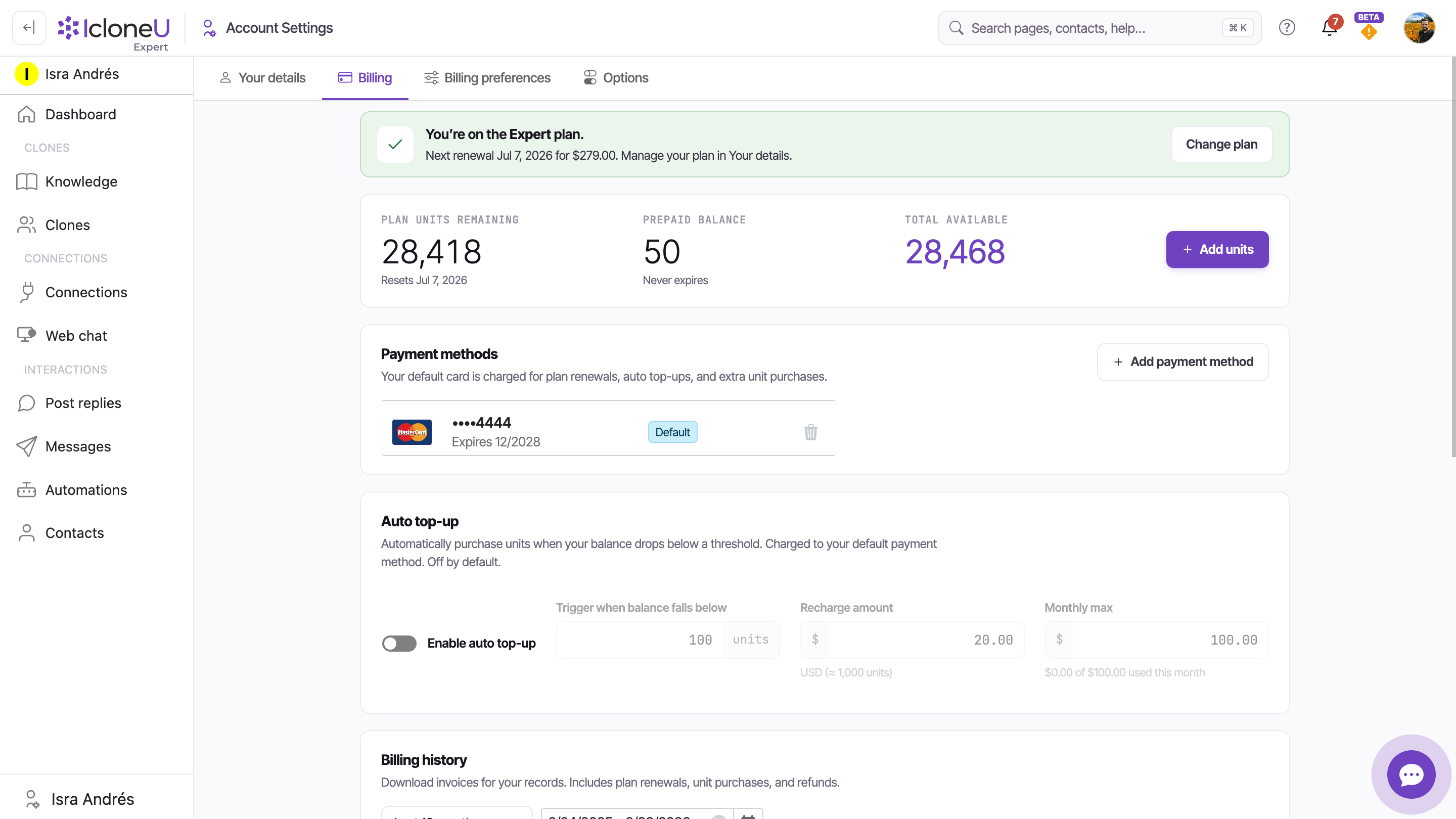
Open the Billing sub-tab. Three stat boxes sit side by side at the top of the page.
Read the three stat boxes
Plan units remaining shows what's left in the current cycle plus its reset date (the "Resets…" line). Prepaid balance shows purchased units, which never expire. Total available is the sum of the two. The + Add units button beside them buys more on the spot.
A second, looser indicator lives in the Dashboard header under the greeting — a counter in the form "104 of 2,500 units / 2,396 LEFT", with an "Active until" date alongside.
The Dashboard's Active until date is your plan's period-end (renewal) date — the same one shown in the Your plan section on the Your details tab. The units-cycle reset date lives on the Billing tab, in the Plan units remaining box.
What happens as you run low
You don't have to keep checking Billing. As your balance gets low, IcloneU notifies you proactively — separately from the Billing stat boxes — so you have time to react before anything stops.
Low means below 15% remaining; Critical means below 5% — or at zero, which always counts as critical. The percentage is measured against your period capacity — the plan grant plus prepaid units, including prepaid already spent this period — not the plan allotment alone. That means buying prepaid units moves the denominator too, so the same number of remaining units can read differently before and after a purchase.
- Where the warning shows. Three places, always addressed to the account owner: a banner on the Dashboard's greeting card, a LOW / CRITICAL badge on the UNITS gauge further down that page, and a bell notification. The Low notification is in-app only; the Critical one is also emailed (and pushed on mobile).
- When it fires. After a debit that crosses the balance into a worse tier — alerts don't repeat at every message, and they stay quiet while Auto top-up is on and healthy.
- Auto top-up is a different dial. Its trigger is an absolute number of units you choose yourself — it is not tied to the 15% / 5% alert percentages.
If the balance does reach zero and Auto top-up is off (the default), the Clone stops replying until the next monthly reset or until you buy more units. To restore service, click + Add units at the top of the Billing tab and buy a one-off top-up — replies resume as soon as the purchase completes. With Auto top-up on, the platform buys units for you before the balance empties, within a monthly cap you control — see the next section.
The stop covers every channel — social and email, the embedded web chat, the mobile app, the Playground and the Reviews widget. Your customer's message is not lost: it's saved and waits in Messages, unanswered, until you top up (blocked replies aren't sent retroactively — the Clone answers from the next incoming message). Two things keep working at zero: configured auto-replies, because they use no paid AI, and a human agent replying in a conversation already under active handover.
Increasing capacity
Three routes, depending on whether the squeeze is one-off or every month:
- One-off purchase — the + Add units button on Billing. Purchased units go to your Prepaid balance and never expire.
- Auto top-up — opt-in automatic refills whenever the balance drops below a threshold; set it up once and stop thinking about it (steps below).
- Plan upgrade — if you exceed the included units month after month, a bigger plan is usually cheaper than paying overage through Auto top-up. Use Upgrade plan in the Your plan section of the Your details tab.
Open the Auto top-up card
On Account settings → Billing, scroll to the Auto top-up card. Its own description sets expectations: units are purchased automatically when your balance drops below a threshold, charged to your default payment method — and it's off by default.
Turn on the toggle
Flip Enable auto top-up on, then set the three controls below.
Set the three controls
Trigger when balance falls below is the unit count at which a recharge fires (the form defaults to 100 units). Recharge amount is the dollar amount of units added each time (default $20.00, ≈ 1,000 units). Monthly max is the hard cap on auto-charges in a single month (default $100.00) — Billing shows a running "$0.00 of $100.00 used this month" meter against it.
TipMonthly max doubles as your cost control: auto-charges never exceed it in a single month.
Leave Auto top-up off. With it disabled, IcloneU never charges your card beyond the plan price — if you hit zero, buy a one-off top-up with + Add units whenever you choose.
The Playground spends units too
Testing isn't free. The Playground runs your Clone with its real configuration — identity, personality, knowledge and skills — through the same metered pipeline as live conversations, so every test reply draws from the same balance (verified live: each Playground reply decremented it). It's the right place to test; just test deliberately rather than spamming long sessions — what one reply costs varies with reply length, knowledge retrieval and the skills used.
Frequently asked
No. Plan units reset each cycle and whatever you didn't use is forfeit — the Plans tooltip says so explicitly. The exception is your Prepaid balance: units you purchase yourself never expire.
There's no fixed number, because metering is token-based rather than per-reply. How far your monthly allotment stretches depends on reply length and how much knowledge each reply retrieves — short replies cost less than long, knowledge-heavy ones. Watch Plan units remaining in Billing to see your own pace.
Only if you've enabled Auto top-up, which is off by default. With it off, nothing is charged — the Clone stops replying at zero until the reset or a manual purchase. With it on, recharges go to your default card in increments of your Recharge amount, never exceeding your Monthly max in a single month.
Yes — confirmed by live measurement: with no channels connected, each Playground reply visibly decremented Plan units remaining. There's no free test mode; the Playground uses the Clone's actual configuration and the same metered path as production.
Last updated August 11, 2026 · AI Clones