Billing questions almost always sort into three buckets: a Clone that went quiet, a charge you didn't expect, or a card you need to change. This guide walks each one to the page that answers it — the Billing tab for your units balance and history, and the Stripe-hosted receipt behind every charge. Where a specific failure (a declined card, a disputed charge, a failed Auto top-up) needs a human, it points you to support rather than guessing.
Click your avatar in the top-right corner, choose Account settings, then open the Billing sub-tab. That's where your units balance, payment cards, Auto top-up and billing history all sit. A separate Billing preferences sub-tab holds invoice details (company name, tax ID) — different page, covered in Viewing and downloading invoices.
My Clone stopped replying
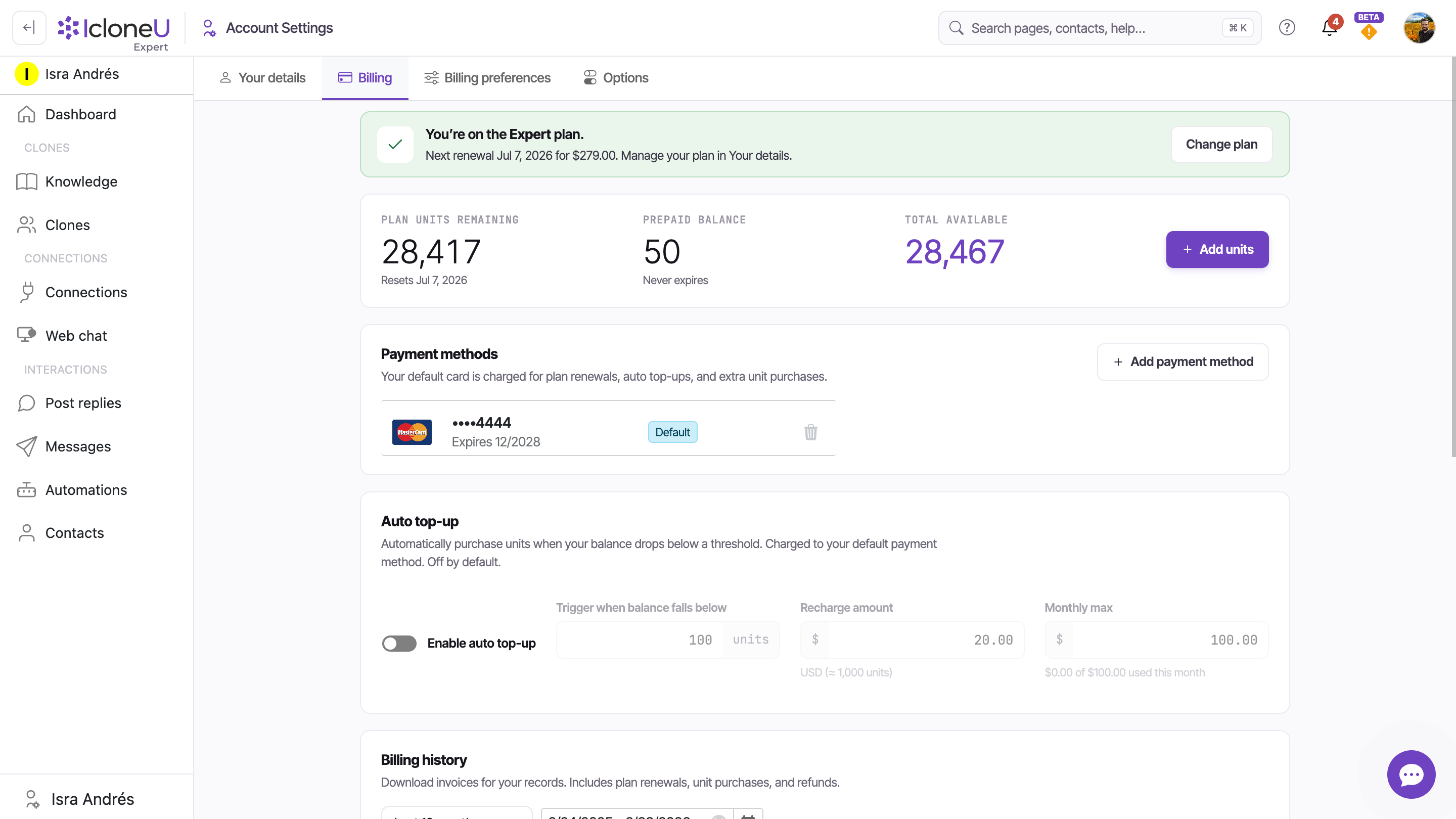
The most common cause is a units balance at zero. Every reply your Clone sends is paid for in units; when the balance empties and Auto top-up is off — which is the default — the Clone simply stops replying until the next monthly reset or until you buy more units. Check the balance first:
Open the Billing tab
Click your avatar (top-right), choose Account settings, and open the Billing sub-tab.
Read Plan units remaining
The first of three stat boxes is Plan units remaining. If it reads 0 (or close to it), an empty balance is almost certainly why replies stopped — and the Resets… line below it tells you when the monthly allotment refills on its own.
Add units to restore service now
To bring the Clone back before the reset, click + Add units at the top of the Billing tab and buy a one-off top-up. Replies resume as soon as the purchase completes — purchased units land in your Prepaid balance and never expire.
Turn on Auto top-up on the same Billing tab and the platform buys units for you before the balance empties, within a monthly cap you set — so the Clone never goes quiet for lack of units. The full walkthrough, including the cost cap, is in Understanding usage and limits.
An empty balance is the billing-side cause. If the balance looks healthy and replies still aren't going out, the problem is elsewhere — a disconnected channel, a paused account or a configuration issue. Work through My AI Clone isn't responding for those.
I got a charge I didn't expect
IcloneU charges your default card in only a few situations, and your Billing history names every one of them. Before assuming something's wrong, match the charge against these:
| Charge | What it is |
|---|---|
| Plan renewal | Your annual (or monthly) subscription renewing on its cycle date — the Billing banner shows the next renewal date and amount in advance |
| Auto top-up | An automatic unit purchase — only happens if you turned Auto top-up on; each charge equals your Recharge amount and never exceeds your Monthly max |
| Extra units | A one-off top-up you bought yourself with + Add units |
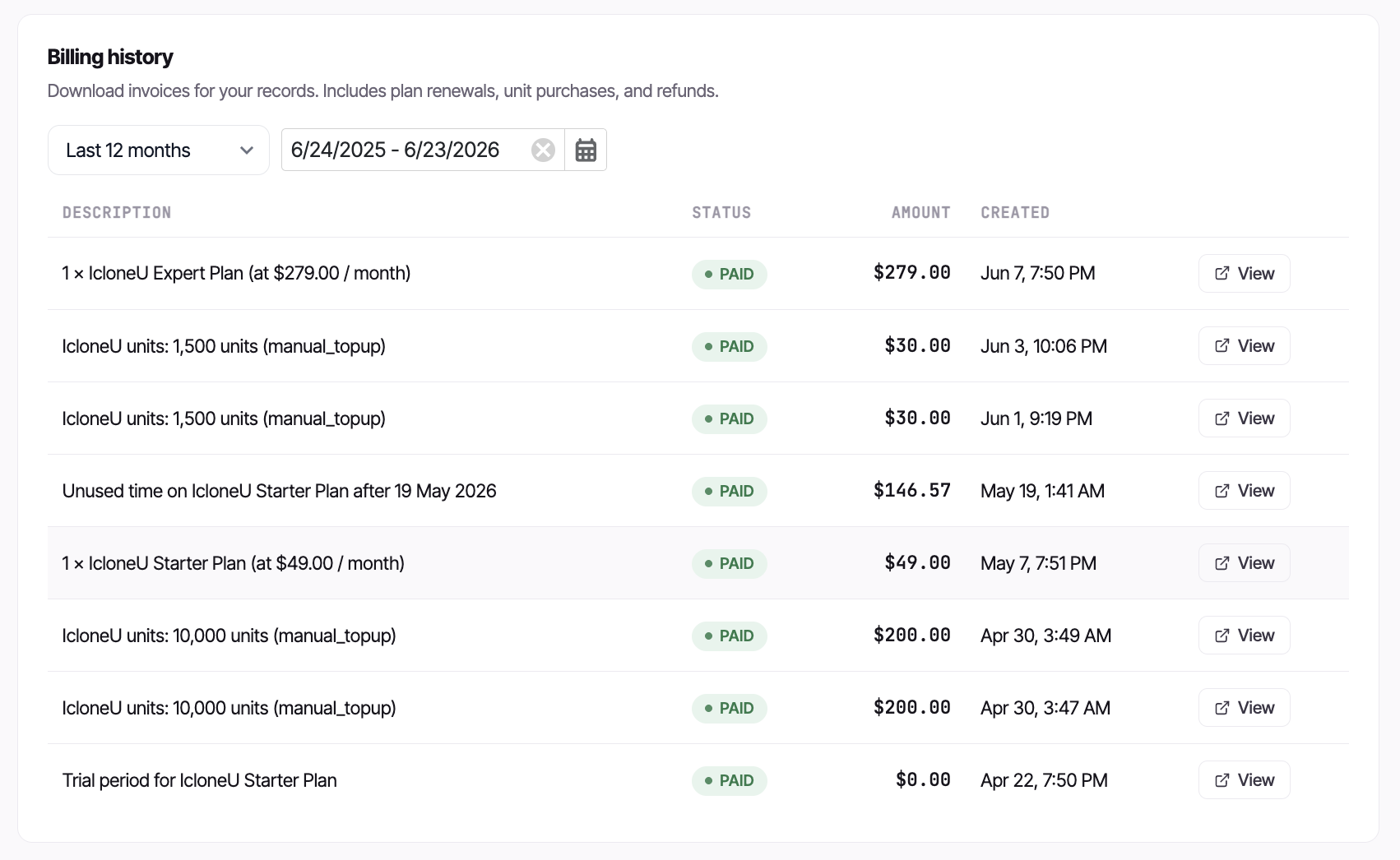
To see which one a charge was, open the Billing history table lower down the Billing tab. Each row shows a description, status and amount; the date-range filter at the top widens the window if the charge is older than the default range.
Find the charge
Scroll to Billing history on the Billing tab. Widen the date range if the charge isn't in the default window.
Open its receipt
Click View on the row. This opens that charge's itemised receipt on a Stripe-hosted page in a new tab — the description there spells out exactly what was billed.
Save or print if you need it
There's no direct in-app PDF download — save or print the receipt from the Stripe page itself.
If a charge still doesn't match a renewal, an Auto top-up or a top-up you made — or you believe it's a genuine error or a duplicate — IcloneU's published help doesn't document a self-service dispute or refund flow, so don't expect an in-app button for it. Gather the date and amount from the receipt and contact support to look into it.
An Auto top-up charged me
If the charge was an Auto top-up, it means the feature is on — it's off by default, so it only fires after you've opted in. When your balance drops below the trigger you set, the platform buys a batch of units automatically and charges your default card. Two things to know:
- It's capped. Auto top-up never charges more than your Monthly max in a single month, and the Billing page shows a running "used this month" meter against that cap.
- You can switch it off. To guarantee zero charges beyond your plan price, turn Auto top-up off on the Billing tab. With it off, hitting zero just stops replies until you top up manually — no card is charged.
If an Auto top-up charge fails — say the card was declined — the specific error shown for a failed Auto top-up and its exact retry behaviour aren't documented in IcloneU's help, so this guide won't invent codes for that path. (One documented cause is now the exception rather than the rule — a Mexican card or American Express is normally just charged in MXN automatically, and the USD decline only appears in edge cases; see My card was charged in pesos (MXN) — or declined.) The practical fix is the same either way: confirm your default card is current (see below), then re-enable Auto top-up. If it keeps failing on a card you know is good, contact support. (A failed renewal is different — that surfaces as a one-click Past due pill; see A renewal payment didn't go through.)
My card was charged in pesos (MXN) — or declined
If you pay with an American Express or a Mexican-issued card, a purchase on a USD-billing account isn't normally declined — those cards can only be charged in MXN, so IcloneU simply charges them in pesos automatically. The purchase screen switches to the peso layout and shows a note explaining it: "American Express and Mexican-issued cards are charged in Mexican pesos (MXN). The peso amount shown above will be charged to your card." The same automatic switch covers Auto top-ups, saved-card purchases and new subscriptions. If you'd rather keep all your billing coherently in pesos — prices, receipts and 16% IVA included — set your billing country to Mexico: it's the country of your Primary business address, so click your avatar (top-right) → Account settings → Billing preferences sub-tab, change the address's country to Mexico and save.
A decline can still happen in a few fallback cases — for example when the card's details can't be checked at charge time, or when an existing USD subscription renews against a card that only accepts pesos. When a + Add units purchase is refused this way, the app shows: "This card can't be charged in USD. Mexican cards and American Express only accept charges in MXN — change the country in your account settings (Billing preferences tab) to Mexico and try again." For that purchase, the country change described above is the fix — make it, then retry. A renewal refused this way shows as a Past due payment instead, and because a subscription keeps the currency it was created in, it needs a card that accepts USD — see A renewal payment didn't go through.
A renewal payment didn't go through
When a subscription renewal is declined, IcloneU doesn't just fail quietly — it marks the account past due and gives you a one-click way to settle it. A red Past due (or Unpaid) pill appears next to your plan name in two places: the Dashboard hero and the top toolbar.
Click the Past due pill
On the Dashboard hero or the top toolbar, click the red Past due / Unpaid pill next to your plan name. Its tooltip reads "Your last payment didn't go through. Update your billing to keep your plan active."
Pay the outstanding invoice
A pay panel opens showing the amount due and your saved default card. Click Pay now and IcloneU charges that card and settles the invoice for you — no trip to Stripe needed. Your plan reactivates as soon as the charge clears.
If the card asks for extra verification
Some cards need an extra verification step (3-D Secure). The panel now runs that check right where you are — your bank's confirmation window opens, you approve, and the payment finishes. If the in-app check can't complete, use the pay on Stripe link in the same panel to finish on Stripe's hosted page.
If the saved card itself is the problem — expired, or the one that was declined — update it first in Payment methods (next section), then use the pay panel. If the panel keeps failing on a card you know is good, contact support with the date and amount.
I need to update my card
A declined renewal, a failed Auto top-up, or simply a card that's expiring all point to the same fix: update your payment method. (For a declined renewal specifically, the fastest recovery is the one-click Past due pill — see A renewal payment didn't go through above.) Your default card is the one charged for plan renewals, Auto top-ups and extra unit purchases, so keeping it current keeps everything flowing.
Payment cards live in the Payment methods section of the same Billing tab — add a new card with Add payment method, and set which card is the default. The step-by-step, including how the default card is chosen, is in Managing payment methods.
Adding or changing your default card doesn't itself restore a Clone that went quiet. After you add or change the default card, bring service back the direct way: buy a one-off top-up with + Add units, or re-enable Auto top-up so the next recharge runs against the new card.
Frequently asked
Check the Plan units remaining box on the Billing tab first. If it's at zero, that's the cause: with Auto top-up off (the default), replies stop at zero until the monthly reset or a manual top-up. Click + Add units to resume immediately. If the balance is healthy, the issue isn't billing — see My AI Clone isn't responding.
The likeliest reasons are a plan renewal on its cycle date or an Auto top-up (only if you'd enabled it). Open Billing history, find the row and click View to read the itemised Stripe receipt — it states exactly what was billed. If it still doesn't add up, contact support with the date and amount.
Turn Auto top-up off on the Billing tab. It's off by default, so if it's charging you it was switched on at some point. With it off, IcloneU never charges your card beyond the plan price — running out of units just pauses replies until you top up manually.
In the Payment methods section of the Billing tab — use Add payment method to add a card and set it as the default. Full steps are in Managing payment methods.
A declined renewal shows a red Past due or Unpaid pill next to your plan name on the Dashboard and the top toolbar. Click it to open a pay panel with the amount due and your saved card, then Pay now to settle it in one click — or use the pay on Stripe link if the card needs extra verification. Full steps: A renewal payment didn't go through.
IcloneU's help doesn't document a self-service dispute or refund flow, so there isn't an in-app button to rely on. Open the charge's receipt from Billing history for the details, then contact support with the date and amount to have it reviewed.
No — it's a temporary connectivity blip between the app and the billing service, usually at sign-in. Nothing is charged and nothing changes on your account. If you were already signed in, the app keeps your last-known plan and units data so you can keep working; if it appeared during sign-in, just try again in a moment. Contact support only if it keeps happening.
Last updated September 23, 2026 · Troubleshooting