For most channels, inbound messages reach IcloneU through a webhook — a registration that tells the channel provider (Meta, Telegram, and so on) to push each new message to IcloneU as it arrives. When that registration breaks or falls out of sync, the symptom is distinctive: a channel that used to work goes quiet — no new messages appear in Messages, so your Clone never sees them and never replies. The good news is that the fix is usually the same regardless of channel: Reconnect the Connection, which re-registers the webhook. This guide walks the diagnosis on WhatsApp — the channel we've verified most deeply — then frames the general pattern for the others.
Two different symptoms, two different guides. If inbound messages do appear in Messages but the Clone stays silent, that's not a webhook problem — head to My AI Clone isn't responding. This guide is for when the messages themselves never arrive.
What a webhook is, in one minute
When you connect a channel, IcloneU registers a webhook with that channel's provider: an instruction to forward every new inbound message to IcloneU's endpoint. From then on, a customer's message flows provider → webhook → IcloneU's Messages surface, where the attached Clone reads it and composes a reply that flows back out the same Connection.
If the webhook becomes unregistered or points somewhere stale, that first hop breaks. The provider still receives the customer's message, but it never gets pushed to IcloneU — so nothing shows up in Messages and the Clone has nothing to answer.
YouTube doesn't push comments to IcloneU at all. Its API is pull-based, so IcloneU polls for new comments on a schedule rather than receiving a webhook. "Webhook" framing doesn't apply there: if YouTube comments stop being picked up, treat it as a connection/permission issue, not a webhook one — see Social media connection issues and the YouTube guide.
Confirm it's a webhook problem
Before reconnecting anything, confirm the symptom — it tells you whether you're really looking at a broken webhook or at something on the reply side.
| What you see | What it points at |
|---|---|
| Customer's message never appears in Messages | Webhook side (this guide) — or the Connection is switched off or has no Clone: check its row first |
| Message appears in Messages, but the Clone doesn't reply | Reply side — not a webhook issue (or a workflow answered it: workflow replies don't show in Messages) |
| Some messages get through, others don't | Intermittent — likely provider-side or carrier-side, not a clean webhook break |
So the deciding check is simple: open Messages in the left sidebar and look for the customer's recent inbound. If it's there, this isn't your guide — see My AI Clone isn't responding. If it's genuinely missing, the webhook is the prime suspect.
The worked example: WhatsApp
WhatsApp is the channel whose webhook flow we've verified most thoroughly, so it's the clearest example. The same shape applies to the other Meta channels (Facebook, Instagram), but treat the platform-side specifics below as WhatsApp-grounded rather than confirmed identical everywhere.
Check the Connection is still there and Enabled
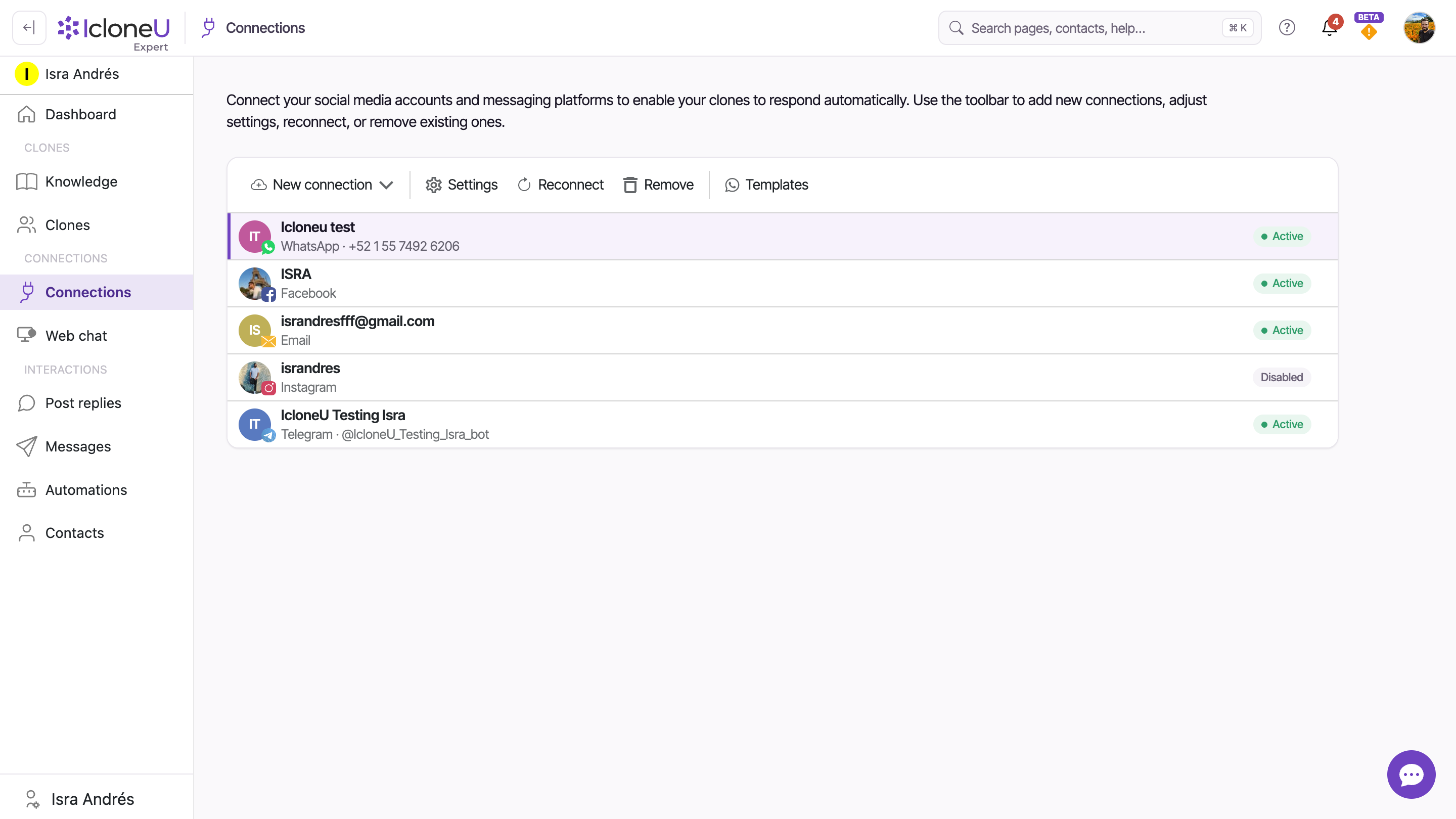
Open Connections in the left sidebar and click the WhatsApp Connection. Select it and open Settings (the gear). The panel — headed Account options for <name> — has an Enabled toggle at the top. If it's switched off, incoming messages are deliberately ignored; that's a pause, not a webhook break. Turn it back on and Save.
NoteThe Enabled toggle's own description spells out the difference: "When off, incoming messages and comments for this account are ignored. Tokens are kept so you can re-enable without reconnecting." So an off toggle is the easy case — no reconnection needed, just switch it on.
Read the Connection's status
Back on the Connections page, read the Connection's status pill. Active means IcloneU's side is switched on — go on to the next step. No Clone means no Clone is attached, so IcloneU drops everything that arrives and a Reconnect won't help: open Settings, pick a Clone, switch Enabled on and click Save. Disabled is the switched-off state from step 1. Reconnect required means IcloneU's access was revoked or lost on the platform's side, and reconnecting (next step) is the fix. A red badge on the account's picture carries an error message; hover it to read it.
Reconnect to re-register the webhook
Use the Reconnect action on the Connection. Reconnecting re-runs the channel's authorization and re-registers IcloneU's webhook with the provider — which is what restores the inbound pipe when the registration has gone stale. You'll be sent back through the channel's login/authorization flow; complete it as you did when first connecting.
TipReconnect is the safe first move: it just re-establishes the link, leaving the Connection, its settings and its conversation history untouched.
Send a test message and watch Messages
From a different phone (not the business number itself), send a message to your WhatsApp business number. Open Messages and watch for it to land. If it appears, the webhook is delivering again and the attached Clone can pick it up.
If reconnecting doesn't restore delivery, the webhook can be inspected where Meta owns it: Meta Business Manager → WhatsApp Manager, in the webhook configuration for your business number. Confirm the callback URL is IcloneU's endpoint, that the message events are subscribed, and that there's no recent failure log showing IcloneU's endpoint rejected deliveries. This Meta-side surface is documented for WhatsApp; we haven't verified an equivalent panel for every other channel, so lean on Reconnect first elsewhere.
The same pattern on other channels
The principle generalizes even though we've verified the platform-side details most deeply on WhatsApp: a broken or disconnected webhook means inbound stops, and reconnecting re-registers the webhook. So the first move on any push-based channel is the same — confirm the Connection is Enabled and connected, then Reconnect.
- Facebook & Instagram — like WhatsApp, these route inbound through Meta. The reconnect-to-re-register move is the standard fix; the deeper per-channel surfaces aren't documented here. For broken or expired Meta links generally, see Social media connection issues, plus the Facebook and Instagram guides.
- Telegram — Telegram delivers via a webhook too, and a Telegram bot allows only one active webhook at a time. If another tool claimed your bot's webhook, IcloneU stops receiving updates until you reconnect (which re-registers IcloneU's). See the Telegram guide.
- YouTube — no webhook at all; IcloneU polls. If comments stop being picked up it's a connection/permission matter, not a webhook one — see YouTube.
- Web Chat — embedded directly on your site rather than via a provider webhook, so this whole class of problem doesn't apply; if the widget isn't loading, that's a setup question — see Embed web chat.
Reach for Reconnect, not Remove. Removing a Connection disconnects the account and deletes its settings — your conversation and post history is preserved and reattaches automatically if you reconnect the same account later, but you'd still have to set the channel up from scratch (history is only purged if you tick the opt-in delete-history checkbox in the confirmation dialog). Reconnect re-establishes the link without touching anything.
If it's still not arriving
If you've reconnected and confirmed the Connection is Enabled but messages still aren't landing, gather the details support needs rather than guessing further:
- The Connection (channel + the account/number/handle it's attached to).
- The timestamp of a specific message that should have arrived but didn't.
- On WhatsApp/Meta, a screenshot of the Meta-side webhook delivery log if you can reach it.
- Whether the provider itself shows any health notice (for example, a Meta policy or quality-rating warning on the account).
A provider-side restriction — a policy strike, a quality-rating drop, a suspended account — can block delivery in a way no reconnect will fix, because the block lives on the provider's side, not IcloneU's. That's worth checking on the channel provider before assuming the problem is inside IcloneU.
Frequently asked
It re-runs the channel's authorization and, in doing so, re-registers IcloneU's webhook with the provider — restoring the inbound pipe when the registration has gone stale. The Connection and its history stay intact; only the link is re-established. This is the standard recovery for a webhook that's fallen out of sync.
No. When the Enabled toggle is off, IcloneU deliberately ignores incoming messages and comments for that account — but the tokens are kept, so you can switch it back on without reconnecting. A broken webhook is different: the messages aren't reaching IcloneU at all. Always check the Enabled toggle first, since it's the quicker fix.
YouTube's API doesn't support webhooks, so IcloneU doesn't register one — it polls for new comments on a schedule instead. There's no webhook to break or re-register. If YouTube comments stop coming through, treat it as a connection or permission issue and check the YouTube guide and Social media connection issues.
No. If the inbound message shows up in Messages, the webhook is doing its job and the issue is on the reply side. First glance at the Connection itself: if its authorization has expired, the Connection shows a Reconnect required pill — IcloneU keeps saving incoming messages but pauses automations and AI replies until you Reconnect (this guide's step 3), and everything resumes on its own once you do. If a workflow handled the message, nothing may be wrong at all: Messages shows the customer's message but not the workflow's replies, which don't appear there today. Otherwise the cause is on the reply side — a reply held by Direct-message review, a channel-specific sending rule, or a Knowledge-library setting — work through My AI Clone isn't responding instead.
Last updated September 22, 2026 · Troubleshooting