If you're looking to stop paying for IcloneU, it helps to know up front that there's no standalone "Cancel subscription" button in your account. What the app gives you instead are three different ways to wind down, each suited to a different intent: Pause your account if you're stepping away for a while and want to come back, Downgrade to a smaller plan if you just want to pay less, or Delete your account if you're done for good — deleting is the only action that immediately ends an active subscription. This guide walks all three, and is honest about what each one does and doesn't do.
There's no soft cancel that keeps your account but stops billing at period end. The closest reversible option is Pause. Fully ending a paid subscription means deleting your account, which also deletes your Clones, knowledge and connections. Read the Delete account section before you go that route.
Which option fits what you want
Pick the route by what you're actually trying to do — the three controls live in different places and have very different consequences.
| If you want to… | Use | Where it lives |
|---|---|---|
| Take a break and come back later, keeping everything | Pause account | Account settings → Billing |
| Keep using IcloneU but pay less | Downgrade to a smaller plan | The Plans page |
| Stop a paid subscription right now and leave for good | Delete account | Account settings → Your details |
Pausing and downgrading both keep your data. Only deleting removes it. If you're unsure, pause first — you can always resume, downgrade, or delete later.
Pause your account (reversible)
A pause is the gentlest way to stop being charged without losing anything. You schedule it, it activates at the end of your current billing period, and your account resumes automatically when the pause window ends. The control is the Pause account card on the Billing tab. Its own description sums it up: "Step away temporarily without losing your data. Your pause starts at the end of the current billing period, and your account resumes automatically when the pause ends — you won’t be charged while paused."
The Pause account card is hidden while you're on a trial — a trial is already free until it ends, so there's nothing to pause yet.
Open the Billing tab
Click your avatar in the top-right corner, choose Account settings, then open the Billing tab. Scroll to the bottom — the Pause account card is the last section.
Click Schedule pause
Press Schedule pause to open the confirmation dialog (titled Schedule account pause). It explains what a pause keeps and what it stops: your Clones and knowledge library are preserved; incoming messages aren't answered and automations don't run while paused; and there are no charges while paused.
Pick a duration and confirm
Choose 1 month, 2 months or 3 months (max) from the Pause duration dropdown, then click Schedule pause to confirm. The pause starts at the end of your current billing period, not immediately.
TipYou keep full service until the pause actually begins — the dialog notes you can pause for up to 3 months, after which the account resumes automatically. You can resume sooner anytime from this same card.
Once a pause is scheduled, the card shows a Pause scheduled. notice with the dates and a Cancel scheduled pause button if you change your mind before it starts. While a pause is active, the card reads Account is paused. with a Resume account button so you can come back early.

Downgrade to a smaller plan
If you want to keep using IcloneU but spend less, you don't cancel — you downgrade to a smaller tier. This keeps your Clones, libraries and connections; the smaller plan simply includes less going forward. Downgrades are confirmed from the Plans page, where smaller tiers show a Downgrade to Starter or Downgrade to Pro button.
Open the Plans page
Use the Change plan button on the Billing tab's paid banner, the Upgrade plan button in Account settings → Your details, or the Plan item in the avatar menu. All three reach the same Plans page.
Pick a smaller tier
A tier below your current one shows a Downgrade to Starter or Downgrade to Pro button. Selecting it starts the change and takes you to the checkout step.
Read the change message before confirming
The checkout describes a downgrade plainly: "You're switching to {plan}. Your current {plan} continues until {date}, then you'll pay {amount} going forward." So you keep what you've already paid for through the current period, and the smaller plan's pricing takes over after that.
NoteA smaller tier includes fewer Clones, channels and libraries, as the Plans page lists them. Your content isn't deleted by the switch.
For the full walkthrough of switching tiers and what to expect at checkout, see Upgrade or downgrade your plan. To compare what each tier includes before you step down, see Comparing plans.
Delete your account (the only full cancel)
Deleting your account is the only action that immediately ends an active paid subscription. It is also destructive and permanent — there is no undo. The control is in the danger zone at the bottom of the Your details tab, under the heading Delete account with the warning "Content from deleted accounts cannot be restored."
The confirmation step carries a Subscription Notice: "If you have an active subscription, it will be immediately canceled. You will not receive a refund for any unused portion of your current billing period." So unlike a downgrade, deleting cancels right away and the unused part of the period you've paid for is not refunded.
Open Your details
Click your avatar in the top-right corner, choose Account settings, and stay on the Your details tab. Scroll to the bottom danger section.
Click Delete
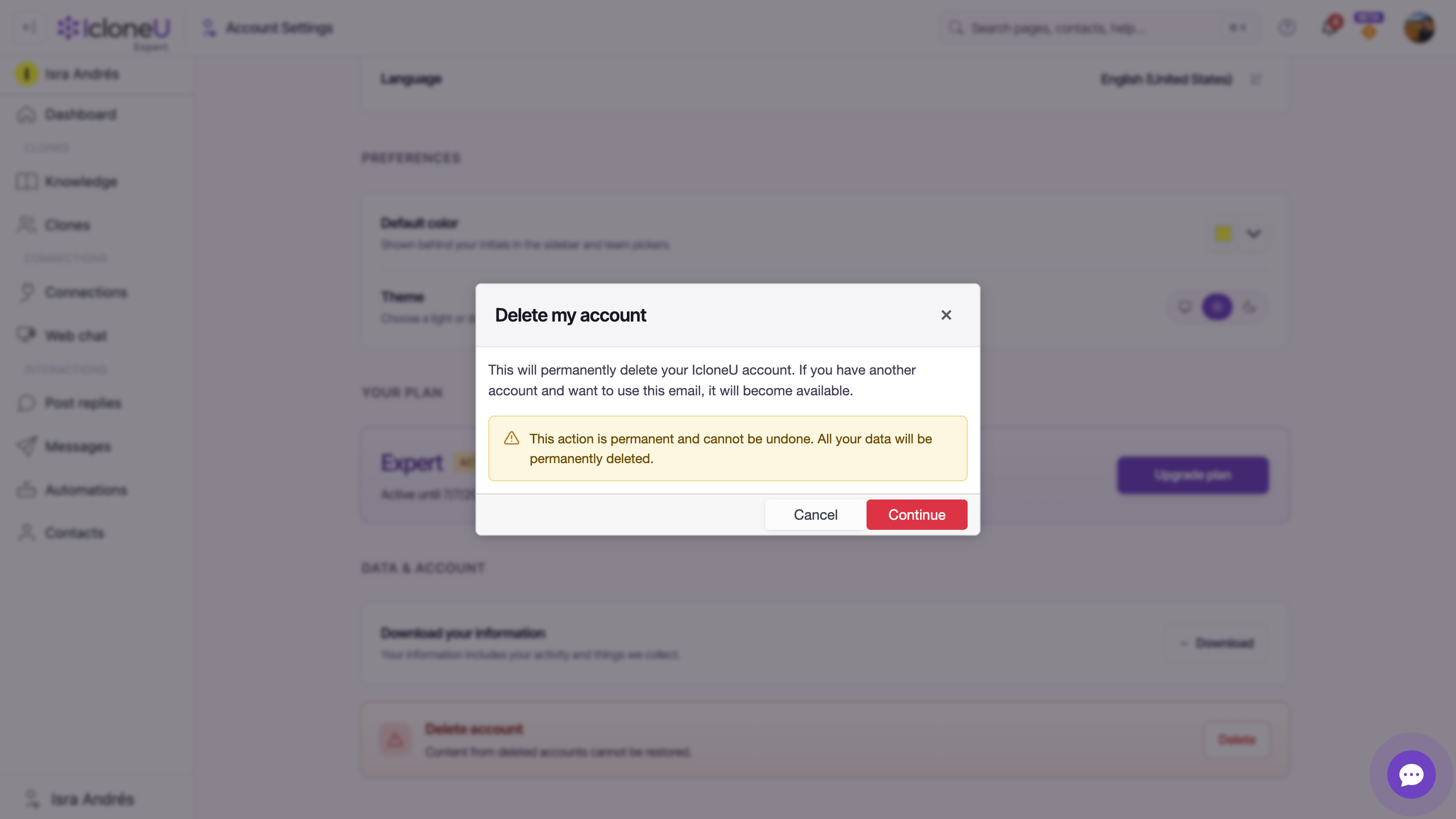
Press the Delete button in the Delete account danger zone. A dialog titled Delete my account opens with a permanence warning: "This action is permanent and cannot be undone. All your data will be permanently deleted." Click Continue to reach the final confirmation.
Confirm with your email and the checkbox
On the final step, type your account email and tick the acknowledgement checkbox to enable the Permanently delete account button. When you click it, the email must match your account email — a mismatch is rejected and nothing is deleted. This is the step that actually cancels the subscription and deletes your data.
Heads upThis deletes your Clones, knowledge libraries, connections, conversations and settings along with the subscription. If you only want to stop paying for a while, use Pause instead.
What happens to your data and billing history
- Pause preserves everything — your Clones and knowledge library are kept, and billing simply resumes when your account does. Nothing is deleted.
- Downgrade keeps your content too; it only moves you to a plan that includes less, from the next period onward.
- Delete permanently removes your Clones, knowledge, connections, conversations and settings, and immediately cancels the subscription with no refund for the unused part of the period.
- Your past invoices remain accessible while the account exists — the Billing history table on the Billing tab keeps a row per charge with a View link to each receipt. See Managing payment methods for that surface.
We're being deliberately careful here: IcloneU does not publish a refund or proration policy for cancellation, and the delete dialog is explicit that the unused portion of a paid period is not refunded. Treat any timing and money details on the screen in front of you as the source of truth, and reach out to support for anything the in-app copy doesn't answer.
Frequently asked
There isn't a dedicated one. To stop being charged you either pause your account (reversible, on Account settings → Billing), downgrade to a smaller plan from the Plans page, or delete your account (on Account settings → Your details). Deleting is the only action that immediately ends an active subscription.
No — pausing is fully reversible. Your pause activates at the end of the current billing period, you're not charged while paused, and your account resumes automatically when the pause ends (or sooner if you resume it yourself). Your Clones and knowledge library are preserved the whole time.
No. The delete confirmation states it directly: an active subscription is immediately canceled and you will not receive a refund for any unused portion of your current billing period. IcloneU doesn't publish a separate refund or proration policy for cancellation, so the wording on that screen is what applies.
Yes. Once you type your email to confirm, tick the acknowledgement checkbox and click Permanently delete account, the subscription is cancelled immediately and your data is permanently deleted. There's no undo, so if you might come back, pause instead.
No. Downgrade to a smaller tier from the Plans page instead. Your current plan continues until the end of the period you've paid for, then the smaller plan's price takes over — and none of your content is deleted. Full detail in Upgrade or downgrade your plan.
Last updated September 23, 2026 · Plans & Billing