A delayed reply is rarely a fault — more often it's the platform working as designed. This guide walks the honest reasons a Clone can be slow to reply: knowledge that hasn't finished processing, channels that poll for new messages instead of receiving them instantly, and a deliberate reply delay you may have switched on yourself. It also clears up one thing that isn't a documented cause, so you don't chase the wrong lead.
IcloneU doesn't publish response-time SLAs. Every duration in this guide — processing minutes, polling cadence, the "stuck" threshold — is observation-based guidance, not a guarantee. Treat the numbers as rough orientation, not a contract.
Knowledge that's still processing
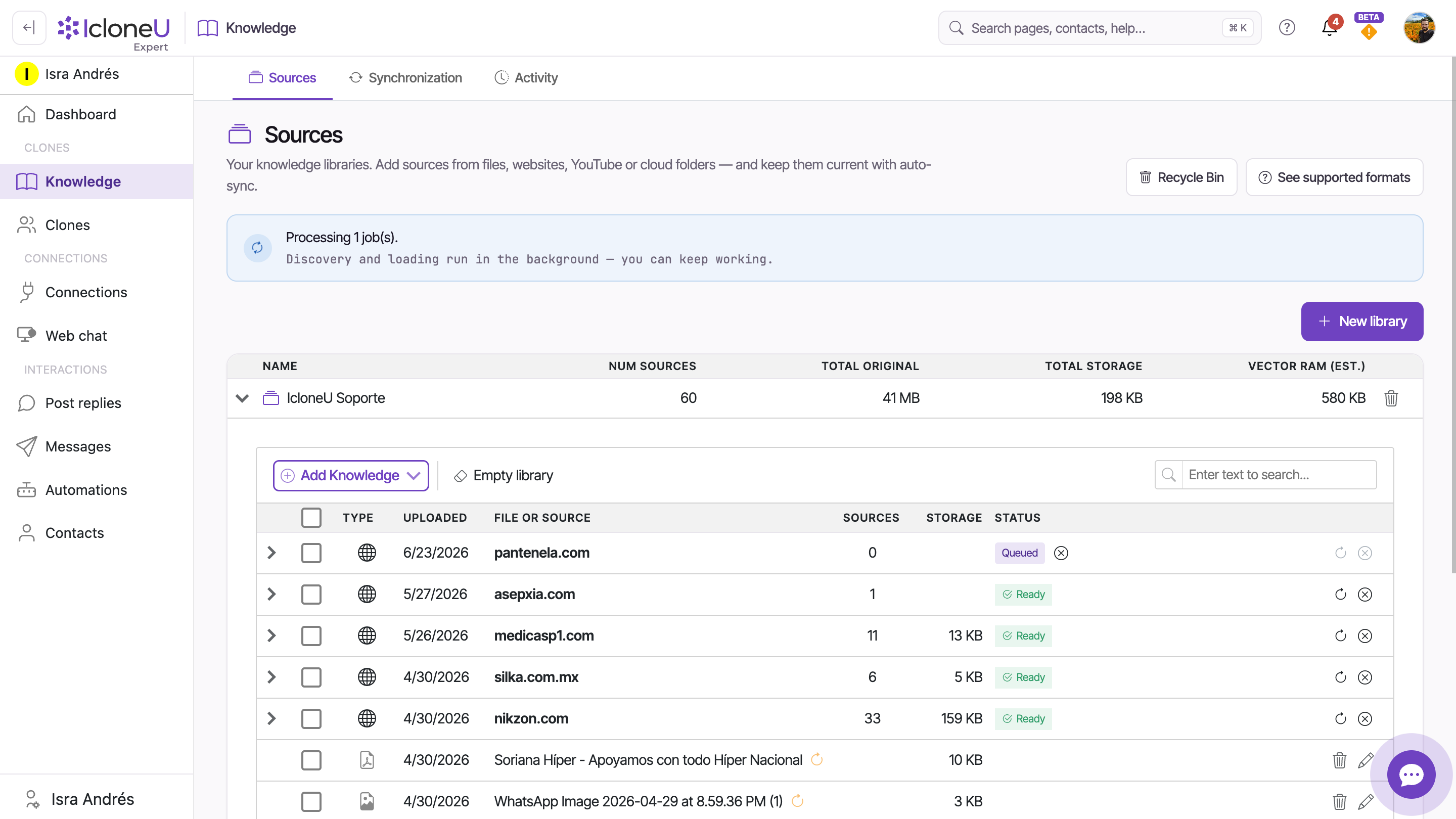
When you add a source to a Knowledge library, your Clone can't answer from it until it finishes processing. A source isn't usable the moment you add it — it has to move through the pipeline first. So a Clone that has just been given fresh material can lag, or answer without it, until that source has finished processing. On the Sources sub-tab, the Status column follows collections, such as a website or a folder, through processing; a single file or web page shows no status there, so follow it in Activity. A run that fails gets no badge of its own: when it ends, the row goes back to what it shows when nothing is running, such as Ready or no status at all, so check Activity, which records the reason.
| Badge | What it means for replies |
|---|---|
| Queued | A collection, such as a website or a folder, is waiting its turn — not yet answerable. While it is processed, its progress shows here instead, such as Processing... |
| Ready | Done — the Clone can answer from it on its next reply. Only a collection that has items shows it; a single file or web page never shows a status |
| Review Items | Items found on a website haven't been added yet — not answerable until you choose them and click Process |
How long processing takes depends on the source: a few short documents are typically ready within minutes, while audio, video and large website crawls take noticeably longer because the platform is also transcribing media and following links. The Activity sub-tab is the place to watch live progress.
As a rough rule of thumb, if a single source has sat in processing for more than about half an hour with no movement in the Activity feed, treat it as a candidate for attention — refresh the page, then re-upload it as a new source. This is guidance, not a guarantee: there's no published SLA, so the figure is a sanity check, not a deadline.
Keeping sources current is its own habit — Keeping your library up to date covers replacing files and re-syncing web sources, both of which start a fresh processing pass.
Channels that poll instead of push
Not every channel delivers a new message to IcloneU the instant it arrives. Some channels poll — IcloneU checks them periodically for anything new — rather than being pushed the message in real time. On a polled channel, a reply can't go out until the next poll has picked the message up, so a short wait is expected even when everything is healthy.
The clearest example is YouTube. The YouTube Data API doesn't push comments to a webhook, so IcloneU polls for new comments. Until a poll fetches a comment, the Clone simply hasn't seen it yet — see Connecting YouTube for how that channel works.
Email is the other channel IcloneU checks on a schedule: it looks for new mail in each connected mailbox about once a minute, so a new email can wait around a minute before the Clone sees it.
IcloneU's polling cadence is not a constant interval you can quote — it's a dynamic formula that adapts to factors like how recently the content was published and how many messages are currently coming in, so more-recent, higher-traffic content is checked more often. That makes reply latency on polled channels adaptive by design. On YouTube each video has its own interval: a check that finds new comments brings it back to the shortest interval, and each check that finds none doubles it, up to every 4 hours for a video published in the last 30 days and once a day for older ones. In Post replies, Refresh from Platform checks the videos on screen right away. Because the cadence varies, there's no single "replies arrive within N minutes" figure to promise.
Push-based channels don't have this particular wait — the message reaches IcloneU as it's sent. If a Clone is silent rather than merely slow on a connected channel, that's a different problem; start with My AI Clone isn't responding.
One thing that isn't the cause
It's tempting to blame slowness on how busy your account is — how many units you've used, or how much load the Clone is under. There's no documented link between your unit balance or workload and how fast a reply comes back. Units meter the cost of AI work, not the speed of it.
Running low on units doesn't slow your Clone down — when the balance reaches zero (and Auto top-up is off), the Clone stops replying entirely rather than replying slowly. If replies are merely delayed, your unit balance isn't the reason. For how units actually behave, see Understanding Clone response limits.
A reply delay you may have set
There's one cause that lives entirely in your own settings: a reply delay. IcloneU can deliberately hold replies back by a short, randomized amount so they don't look automated — and if it's switched on, every reply waits before it sends. By default replies are instant, so this only applies if someone turned it on.
Open Account settings
Click your avatar in the top-right corner and choose Account settings from the menu.
Go to the Options tab
Open the Options sub-tab and scroll to the Reply timing card. The card always belongs to your own account, so it holds the team's default reply timing only when the team is yours; in someone else's team, only its owner can change those defaults, and the note below says where you can still see them.
Check the reply delay
Look at Reply delay. If a range is set, a random wait within it is added to every reply; set both numbers to 0 to remove the wait. The same card's Only send replies during certain hours switch can also hold replies until the allowed hours, and the Reply schedule card pauses them on the dates listed there — two more reasons a reply might land later than expected.
When the team is yours, these are its defaults, and each connection can override them: its options panel has its own Reply timing card, where Customize for this account gives that channel its own hours and delay. While that card is on Use team defaults, it shows the team's timezone, hours, days and Reply delay, read-only, so in someone else's team you can check the defaults there: on the Connections page, select one of the team's connections and click Settings. A connection whose Direct-message review is set to Auto-send after a delay also holds matching direct-message replies for its review period. A reply that is waiting shows its send time in the conversation, on a Scheduled or In review pill. The full walkthrough is Reply timing and handover settings.
Still stuck?
Work through the three honest causes in order: has the relevant knowledge finished processing, is the channel one that polls, and is a reply delay switched on? Most slow-reply reports resolve at one of those three.
If a knowledge source is genuinely stuck — no movement in Activity well past the ~30-minute heuristic, even after a refresh and a re-upload — that's the point to contact support, with the source ID and library name. Remember the heuristic is guidance, not a deadline: a long video or a large crawl can legitimately take a while.
There's no published figure — IcloneU doesn't set response-time SLAs. On push-based channels a reply typically follows shortly after the message, once any knowledge it needs has finished processing; on polled channels it waits for the next poll, whose cadence varies. Treat any number you hear as orientation, not a promise.
Almost certainly because it hasn't finished processing yet — a source isn't usable until it does. A single file shows no status on Sources, so check the Activity sub-tab for live progress; small text documents are usually ready within minutes, media and large crawls take longer. If it sits with no movement past roughly half an hour, refresh and re-upload, then contact support if the new copy stalls too.
Because YouTube is a polled channel: its API doesn't push comments, so IcloneU checks for new comments on a cadence rather than receiving them instantly. The cadence is a dynamic formula that varies with recency and inbound volume, so there's no fixed interval to quote — a short wait is normal.
No. Units aren't a documented latency factor. A low or empty balance doesn't make replies slow — when it hits zero with Auto top-up off, the Clone stops replying altogether. If replies are merely delayed, look at processing status, channel polling or the reply-delay setting instead.
Under Account settings → Options, in the Reply timing card: set both Reply delay numbers to 0 (in someone else's team, only its owner can). Replies are instant by default, so a delay only applies if it was switched on there. If one channel is still slow, open that connection's options: its own Reply timing card may be set to Customize for this account, and on Use team defaults it shows the team's Reply delay, read-only.
Last updated September 23, 2026 · Troubleshooting