Account deletion is permanent and removes everything at once — there is no undo and no recycle bin for it. The product is blunt about it: the danger card that holds the button says plainly, "Content from deleted accounts cannot be restored." Because there is no undo and no recycle bin, the flow is deliberately slow — a three-step dialog with a final confirmation, a typed email match, and an acknowledgement checkbox before the destructive button will even light up. This guide describes that flow and what each warning tells you, so nothing about the outcome is a surprise.
Deleting your account permanently removes it. There is no restore. If you are deleting because of a single setting — billing, a channel, a Clone — fix that setting instead; deletion is not the way to pause or downgrade. See Alternatives to deleting below.
Where the action lives
The delete control sits at the very bottom of Account Settings. Open the account menu in the top bar and choose Account Settings to land on the page, then scroll to the Data & account section — it's the last group on the page.
Inside that section is a red Delete account card. Its warning line reads "Content from deleted accounts cannot be restored." and the action button on it is labelled Delete. Clicking it does not delete anything on its own — it only opens the confirmation dialog described below.
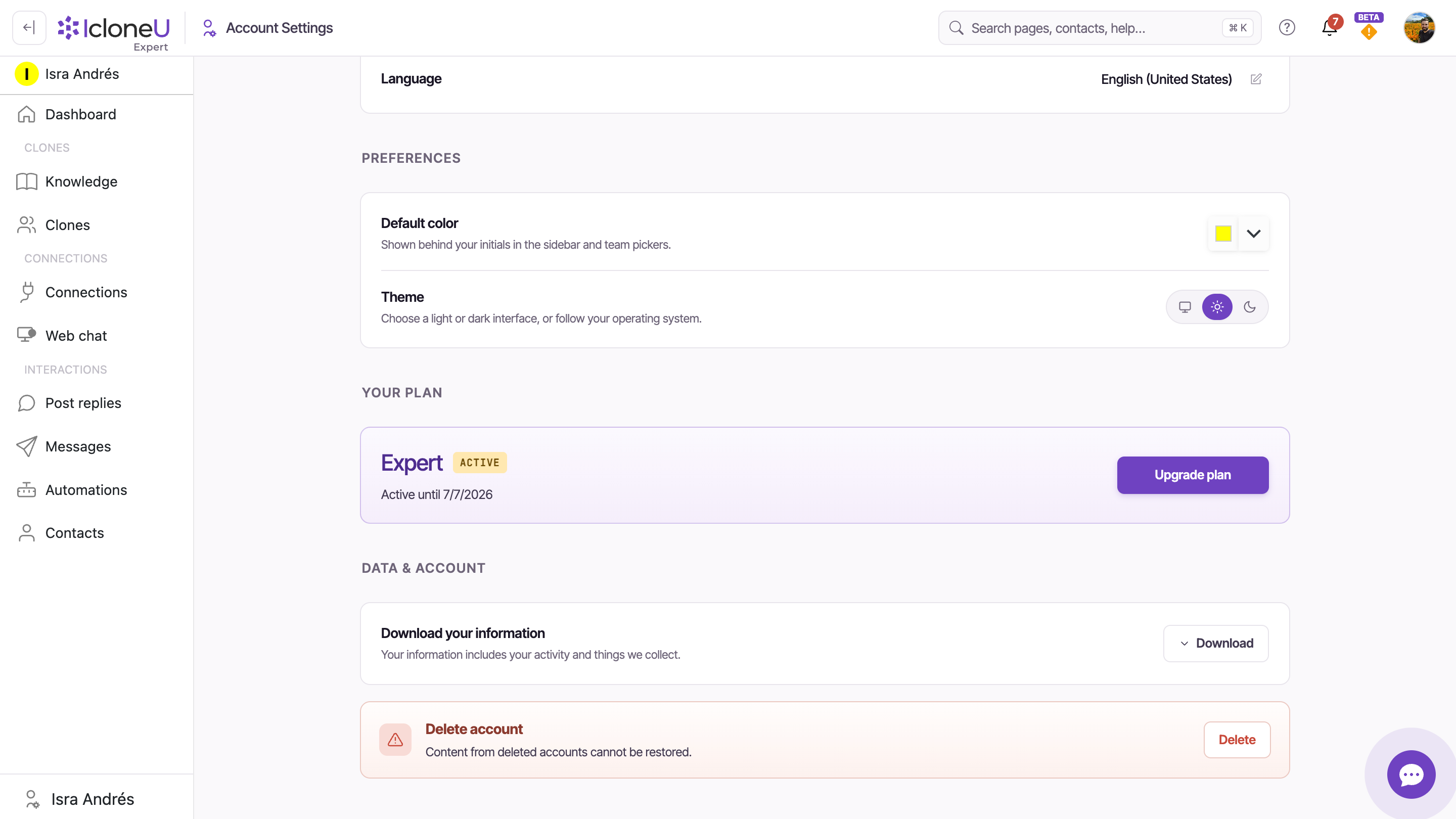
The same Data & account section has a Download your information row with a Download button — described as "Your information includes your activity and things we collect." If you want a copy of anything before it's gone, take it here before you open the delete dialog.
Step 1 — the first warning
Clicking Delete opens a dialog titled Delete my account. The first screen is a plain explanation of what deletion means, followed by a yellow caution box. Nothing is deleted at this stage.
The explanation reads: "This will permanently delete your IcloneU account. If you have another account and want to use this email, it will become available." Below it, the caution box repeats the stakes: "This action is permanent and cannot be undone. All your data will be permanently deleted."
Read the first-screen warning
Confirm you understand that the account is removed permanently and that its email frees up for reuse on another account.
Cancel or continue
Two buttons sit at the bottom: Cancel closes the dialog and changes nothing, and Continue advances to the final confirmation step. Continue still does not delete anything — it only moves you to step 2.
If you close the dialog at any point before the final action, the popup resets to step 1 the next time you open it. Backing out costs nothing.
Step 2 — final confirmation and the safeguard
The second screen is the real gate. It carries a red final-warning box, a subscription notice, an email-match field, and an acknowledgement checkbox. The destructive button stays disabled until you both fill in your email and tick the box.
Under the heading Final Confirmation Required, the red box states: "This action cannot be undone. All your data, settings, and account information will be permanently deleted."
If you have an active subscription, this screen warns you: "If you have an active subscription, it will be immediately canceled. You will not receive a refund for any unused portion of your current billing period." Deleting mid-cycle does not refund the remainder of that cycle.
Type your account email
The field labelled Enter your email address to confirm (placeholder "Enter email...") must contain the exact email tied to your account. The match is checked when you submit; case doesn't matter, but a different address won't pass.
NoteIf the address doesn't match, the dialog shows: "The email address you entered does not match the email associated with your account. Please enter the correct email address to proceed." Nothing is deleted — fix the address and try again.
Tick the acknowledgement box
Check the box that reads "I understand that this action is permanent and cannot be reversed". This and the email field together are what unlock the destructive button.
The destructive button
Only when the email field has a value and the box is ticked does the Permanently delete account button become clickable. Cancel sits to its left and backs out with no change.
Clicking Permanently delete account with the email matched and the box ticked is what actually deletes the account. After that there is no restore. Everything up to this click is reversible by closing the dialog; this click is not.
What happens when it completes
Once the final button is confirmed, the dialog briefly shows a processing state — "Deleting your account..." — and then a confirmation screen titled Account deleted: "Your account and all associated data have been permanently removed. You'll be signed out in a moment." After a short pause you're automatically signed out and sent to the registration page.
| At this point | What the dialog tells you |
|---|---|
| Account | Permanently deleted; cannot be restored |
| Your email | Frees up — reusable on another account |
| Active subscription | Immediately canceled, no refund for the unused portion |
| Session | Signed out automatically and returned to registration |
Every row here is quoted from what the deletion dialog and the Data & account card actually say. IcloneU does not publish a separate data-retention schedule in these screens, so this guide doesn't claim one — if you need detail on what's retained for legal or billing reasons, contact support rather than relying on the dialog copy.
Alternatives to deleting
Most reasons people reach for deletion have a narrower fix that keeps the account intact. Before you start the irreversible flow, check whether one of these solves the actual problem:
- Want your Clone to stop replying on a channel? Turn off the Connection's Enabled toggle instead — it stops handling traffic while keeping its tokens so you can switch it back on without reconnecting.
- Worried about cost? Review your plan and units before deleting; downgrading or pausing replies is reversible, deletion is not.
- Just need a copy of your data? Use Download your information in the Data & account section first.
- Done with a single Clone, not the whole account? Delete that Clone on the Clones page and leave the account standing.
That's a valid choice — just go in knowing it's final. The three-step dialog exists precisely so the decision is deliberate, not accidental.
Frequently asked
No. The product states it directly on the card that holds the button: "Content from deleted accounts cannot be restored." There is no undo and no recycle bin. If recovery matters to you, don't delete — use one of the alternatives instead.
No. The final-confirmation screen warns that an active subscription "will be immediately canceled" and that "You will not receive a refund for any unused portion of your current billing period."
On the final screen the Permanently delete account button only becomes clickable once you've entered an email and ticked the "I understand that this action is permanent and cannot be reversed" box. If it's still greyed out, one of those two is missing.
The email you type must be the exact address on your account (case is ignored). If it differs, the dialog shows the mismatch message and deletes nothing — correct the address and submit again.
Yes. The first warning says so: "If you have another account and want to use this email, it will become available." Deleting frees the email for reuse.
Last updated June 15, 2026 · Account & Settings