Deleting Knowledge in IcloneU is a two-stage process, not a one-click destruction. The first delete is a soft delete: the library, collection or source moves to the Recycle Bin and stays fully recoverable for a window of time. Only a second, explicit action — or letting the window expire — removes it for good. This guide covers that window, what survives it, and the one place the rules differ: deleting a source that several libraries share.
This article is about retention at the Knowledge-library level — libraries, collections and sources, and the Recycle Bin that holds them. It does not cover account-wide data retention, conversation-log storage periods or formal deletion rights. For the retention figures, contact support, as IcloneU does not publish them here; to exercise a formal deletion right, use the data request form.
The 30-day Recycle Bin
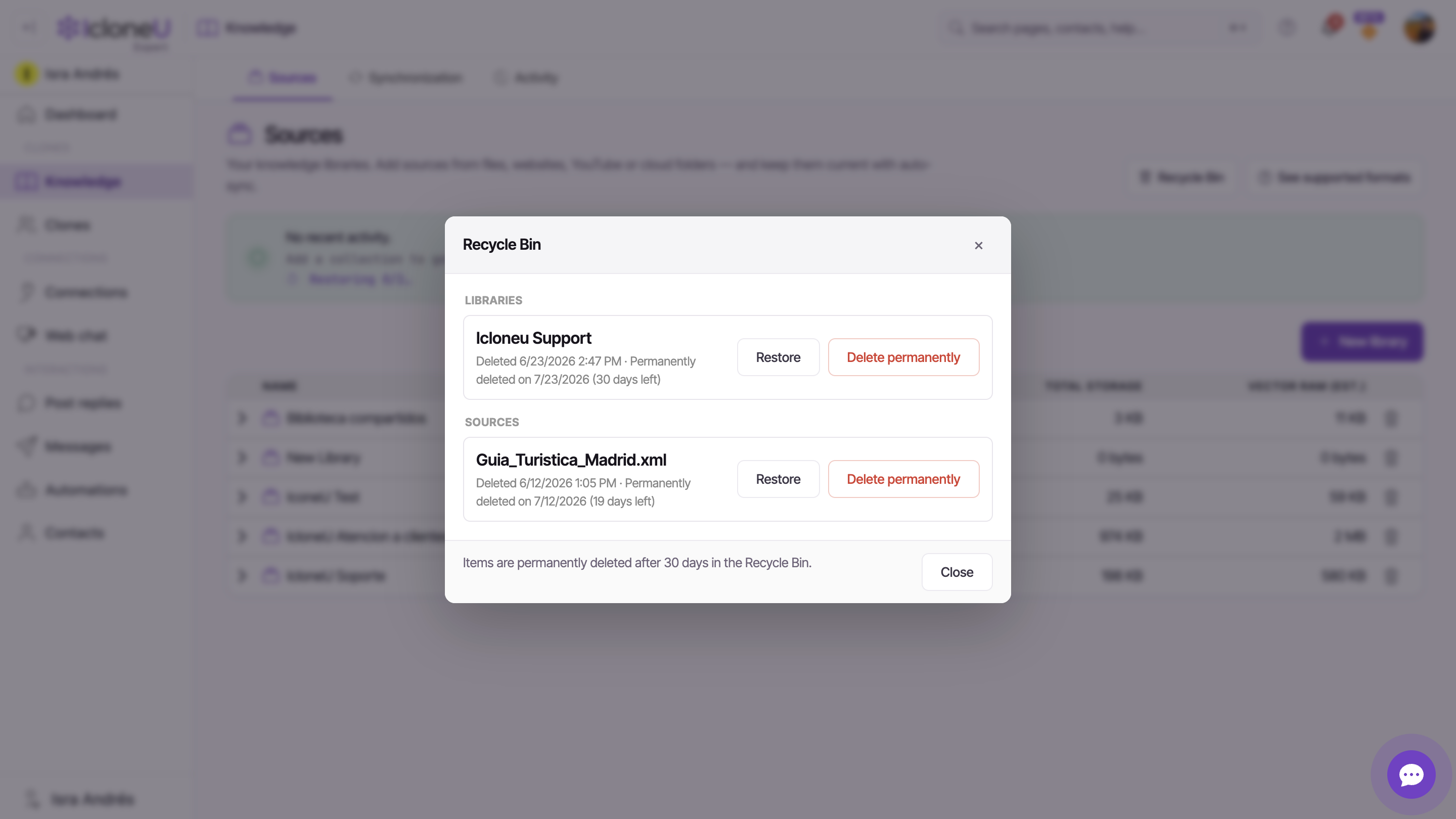
Every time you delete a Knowledge library, collection or source, it goes to the Recycle Bin rather than being erased. You reach the bin from the Recycle Bin button at the top of the Knowledge page. Inside, deleted items are grouped under Libraries, Collections and Sources, each row stamped with when it was deleted.
The bin keeps items for 30 days. The footer states the rule verbatim: "Items are permanently deleted after 30 days in the Recycle Bin." After that window, an automatic background job removes them — you don't have to do anything, and you can't extend it.
Each entry shows its own deadline — "Permanently deleted on <date> (N days left)" (and "(1 day left)" on the final day) — so a library you binned last week and a source you binned today expire on different dates. Check the days-left figure on the specific row, not a single bin-wide clock.
What's recoverable, what's permanent
The line between "can get it back" and "gone for good" is the Recycle Bin. While an item is in the bin and inside its 30-day window, it's recoverable. Once it leaves the bin — whether you remove it yourself or the 30 days run out — it's permanent.
| State | Recoverable? |
|---|---|
| In the Recycle Bin, within 30 days | Yes — click Restore |
| Removed with Delete permanently | No — irreversible |
| Auto-purged after 30 days | No — gone automatically |
Restoring works for the items themselves, but the underlying file content has to still be on hand. If a source's stored copy is gone, IcloneU surfaces it plainly — the toast reads "N source(s) couldn't be restored automatically (no saved copy). Please re-upload them." So for anything you can't easily replace, keep an original outside IcloneU rather than relying on restore alone.
Restore something — or remove it for good
Both actions happen inside the Recycle Bin, one row at a time.
Open the Recycle Bin
On the Knowledge page, click the Recycle Bin button. Deleted items appear under their Libraries, Collections and Sources sections.
Restore to put it back
Click Restore on the row you want back. A toast confirms it — e.g. "Restored 'Product FAQs'" — and the item reappears in your Sources list with its contents intact. A restored library comes back with its sources, and a restored shared source returns to every library it belonged to.
Or delete it permanently
Click Delete permanently to remove the item now instead of waiting out the 30 days. This is the irreversible step — there's no second Recycle Bin behind it.
Heads upDelete permanently can't be undone. Before you use it, make sure you won't need the item again, or that you have a copy outside IcloneU. If you're unsure, just leave it in the bin and let restore stay an option.
When you first move something to the bin, the confirmation toast carries an Undo action — the quickest way to reverse a mistaken delete without even opening the Recycle Bin. After the toast fades, recover it from the bin instead.
Deleting a shared source: this library vs everywhere
Most retention follows the single rule above. There's one place it branches: deleting a source that more than one library uses. Because the same source can be linked into several libraries, IcloneU asks whether you mean to remove it from just the current library or from all of them — two different actions with two different outcomes.
- Remove from this library takes the source out of the library you're in, but leaves it in place everywhere else. It's a scoped unlink — the source is not sent to the Recycle Bin, because it still exists in its other libraries. The dialog spells out where it survives: "Remove '<source>' from this library? The file will remain in <other libraries>."
- Delete (which becomes Delete from all libraries for a shared source) sends the source to the Recycle Bin and removes it from every library at once. A blast-radius confirmation names the others first: "'<source>' belongs to the library '<owner>' and is also linked in <others>. Deleting it will move it to the recycle bin and it will disappear from all libraries. You can restore it from the recycle bin." Restoring it later brings it back to all of those libraries together.
There's no choice to make — deleting it simply moves it to the Recycle Bin like anything else, under the same 30-day window. The two-option dialog only appears when a source is genuinely shared across libraries.
The same scoped logic applies when you clear a whole library at once: the eraser action is labelled Empty library, and it sends this library's own sources to the bin while leaving any shared ones available in their other libraries — exactly mirroring how deleting a library behaves. For the library-delete flow end to end, see Organising your Knowledge Library.
What this does — and doesn't — cover
To set expectations cleanly: the retention behaviour described here is specific to the Knowledge library.
| This guide covers | It does not cover |
|---|---|
| Deleted libraries, collections and sources | Conversation / message log retention periods |
| The 30-day Recycle Bin and per-item expiry | Account-data retention after account closure |
| Restore vs Delete permanently | Formal data-subject / deletion-rights requests |
If you need a retention figure for something outside the Knowledge library — how long conversations are kept, or what happens to account data after closure — reach out to IcloneU support rather than inferring it from this page. To make a formal deletion or other data-subject request, use the data request form. We've kept this guide to what the product surfaces and enforces today.
Frequently asked
Up to 30 days from when it was deleted, per item. Each row in the Recycle Bin shows its own remaining time — "Permanently deleted on <date> (N days left)" — and once that reaches zero an automatic background job purges it. Restore anything you want to keep before its countdown runs out.
No. Once the retention window expires the item is permanently purged automatically, and there's no Recycle Bin behind the Recycle Bin. The same is true the moment you click Delete permanently — that's the irreversible step. If a source might matter later, restore it in time or keep a copy outside IcloneU.
It depends which action you pick. Remove from this library takes it out of just the current library and leaves it in the others — it doesn't go to the Recycle Bin at all. Delete (shown as Delete from all libraries for a shared source) sends it to the Recycle Bin and removes it from every library at once; a confirmation names the affected libraries first. A non-shared source has no choice — it just goes to the bin.
Yes. A restored library returns to your Sources list with its contents, and a restored shared source comes back to every library it belonged to. The one caveat is the underlying file: if a stored copy is no longer available, IcloneU tells you so and asks you to re-upload that source — so keep originals of anything hard to replace.
On the Knowledge page — click the Recycle Bin button at the top. Deleted items are grouped under Libraries, Collections and Sources, each with Restore and Delete permanently on its row. The deletion-from-the-library side is covered in Organising your Knowledge Library.
Last updated July 7, 2026 · Security & Privacy